
Constructing a Parabola Using Perpendicular Bisectors
Loading the math board and drawing, please wait…
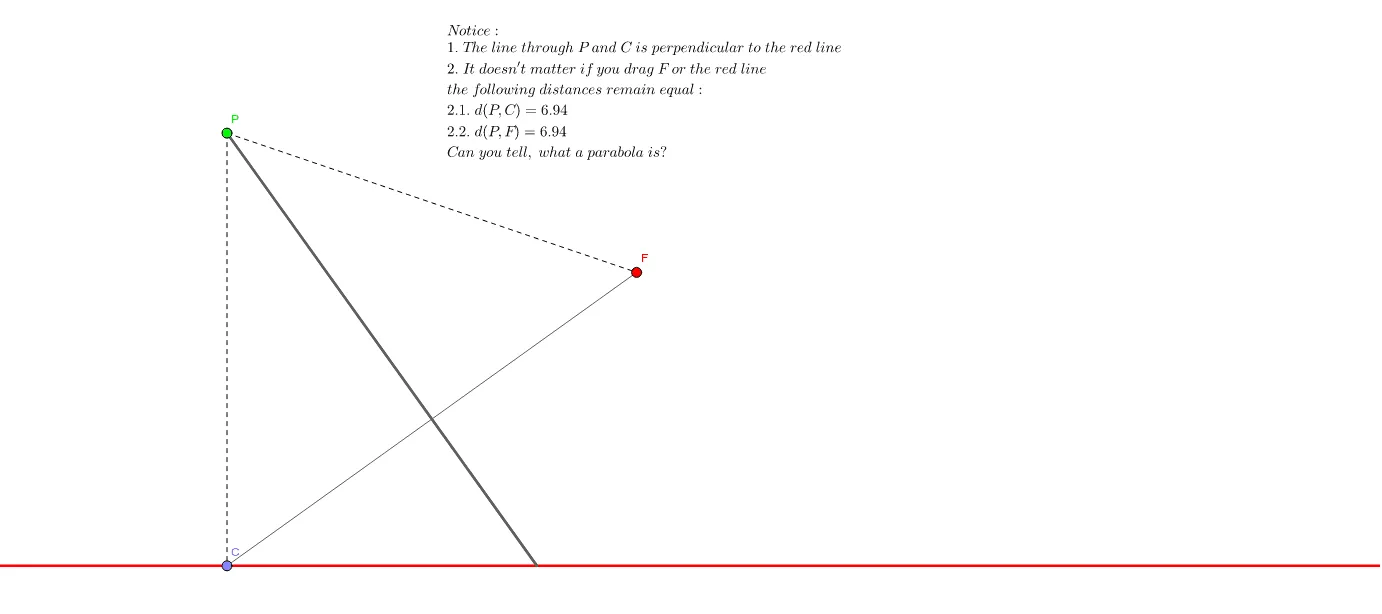
This example illustrates how to construct a parabola using perpendicular bisectors. Key mathematical concepts include perpendicular bisectors and the definition of a parabola. Using GeoGebra commands such as Line, Point, Segment, LineBisector, OrthogonalLine, Intersect, and Distance, a parabola can be constructed. Suitable for high school mathematics education and learning.
GeoGebra Commands & Parameters
Line(A, B) → aPoint(a) → CSegment(F, C) → bLineBisector(b) → cOrthogonalLine(C, a) → dIntersect(c, d) → PDistance(P, F) → d_{PF}Distance(P, C) → d_{PC}Intersect(c, a) → DSegment(P, D) → eSegment(P, F) → fSegment(P, C) → g
AI Drawing Prompt Reference
Construct a parabola using perpendicular bisectors. First, draw a line AB, then take a point C on the line. Draw a line segment from C to point F and find its perpendicular bisector. Draw another line through C that is perpendicular to line AB, and their intersection point P is a point on the parabola. Calculate the distances from P to F and C, then draw line segments from P to F and C.
The prompt above was compiled from the original drawing commands and is for reference only.