
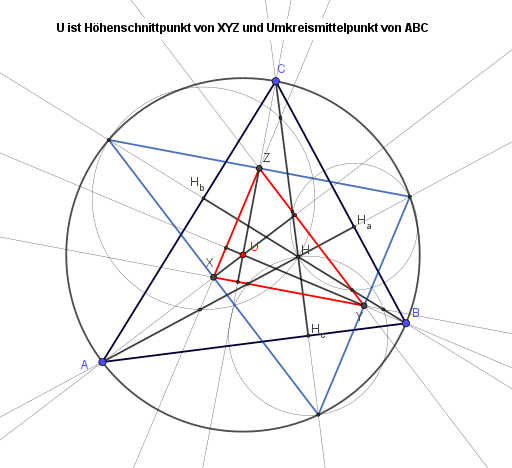
Construct the orthocenter as high intersection XYZ, linked to circumcenter
Loading the math board and drawing, please wait…
In collections
Besondere Punkte/Special Points
This example demonstrates how to construct the orthocenter of triangle ABC by intersecting altitudes, locating points XYZ according to the relevant intersection relationships, and highlighting the geometric connections involving the circumcenter. Key concepts include triangle altitudes, the orthocenter (intersection of the three altitudes), perpendicularity (point-to-line perpendicular construction), circumcenter/ circumcircle, and point determination via line intersections. In GeoGebra, the construction is built with Polygon and Line to form the triangle and supporting lines; OrthogonalLine to draw the altitudes through the vertices; Intersect to compute the intersection points that define the orthocenter-related points (e.g., H and the points X, Y, Z); Circle to create the circumcircle and identify the circumcenter; and Segment to render helpful edges for visualization. Suitable for middle school geometry and enrichment activities, especially for learning geometric constructions and understanding the orthocenter concept interactively.
GeoGebra Commands & Parameters
Polygon(A, B, C) → d1, c, a, bOrthogonalLine(A, a) → fOrthogonalLine(B, b) → gOrthogonalLine(C, c) → hIntersect(f, g) → HIntersect(f, a) → H_aIntersect(g, b) → H_bIntersect(h, c) → H_cSegment(A, H_a) → iSegment(B, H_b) → jSegment(C, H_c) → kCircle(H_a, H) → dCircle(H_c, H) → eCircle(H_b, H) → pIntersect(d, h, 2) → GIntersect(d, g, 2) → IIntersect(p, h, 2) → JIntersect(p, f, 2) → KIntersect(e, g, 2) → LIntersect(e, f, 2) → MLine(I, G) → lLine(K, J) → mLine(L, M) → nIntersect(l, m) → ZIntersect(m, n) → XIntersect(l, n) → YPolygon(X, Y, Z) → d2, z_1, x_1, y_1OrthogonalLine(X, l) → tOrthogonalLine(Y, m) → f_1OrthogonalLine(Z, n) → g_1Intersect(t, f_1) → UIntersect(l, t) → NSegment(X, N) → h_1Intersect(m, f_1) → OSegment(Y, O) → i_1Intersect(n, g_1) → PSegment(Z, P) → j_1Circle(U, A) → c_1Intersect(c_1, f) → D, EIntersect(c_1, g) → F, QIntersect(c_1, h) → R, SPolygon(R, E, F) → d3, f_2, r, e_1
AI Drawing Prompt Reference
Draw a triangle and construct its altitudes, intersecting at the orthocenter. Connect the orthocenter to each vertex and draw the circumcircle. Identify three points related to the orthocenter on the circumcircle, forming another triangle. Finally, connect the orthocenter to these special points on the circumcircle, creating multiple helper segments to illustrate geometric relationships.
The prompt above was compiled from the original drawing commands and is for reference only.