
“Cono” Conic Constructions: Interplay of Hyperbola and Ellipse
Loading the math board and drawing, please wait…
In collections
geometriadinamica.es
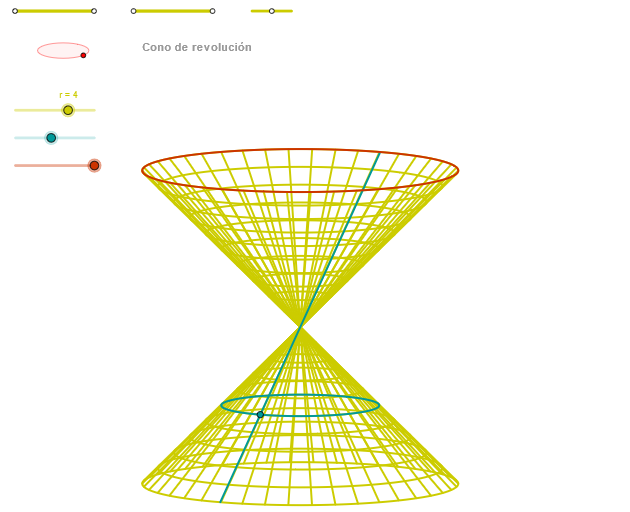
This example demonstrates how a “Cono”-related complex figure can be built in a dynamic geometry environment by using intersections and constraints among several conic sections. It highlights the geometric phenomenon where auxiliary lines and circle-based constructions guide the placement of key points, which then determine the resulting conic curves. The core math concepts include conic sections (hyperbola and ellipse), angle handling and controlled rotation (Angle and zAngRot), and coordinate-geometry curve rendering via CurveCartesian. Construction-wise, the model uses Segment and Point to set up foundational geometry, OrthogonalLine for perpendicular constraints, Circle together with Intersect to generate crucial intersection points, Ellipse and CurveCartesian to draw ellipse and Cartesian curves, and Sequence to manage parameterized or iterative point sets. The object list (e.g., multiple P- and Q- points, vectors/parameters like u* and v*, and computed intermediates such as zz*/ZZ* plus zElipse1/zElipse2) reflects a structured pipeline: build auxiliary constraints → compute intersection anchors → generate conics → assemble the final configuration. Suitable for advanced secondary students and early university learners studying analytic geometry, conics, and GeoGebra-based geometric construction.
GeoGebra Commands & Parameters
Segment(Q3, Q4) → p2Point(p2) → P3Segment(P3, Q4) → p4Point(p4) → P4Segment(Q1, Q2) → p1Point(p1) → P1Segment(P1, Q2) → p3Point(p3) → P2OrthogonalLine(C, yAxis) → zz1Circle(C, 0.62) → zz0Intersect(zz0, zz1, 1) → ZZ1Intersect(zz0, zz1, 2) → ZZ2Ellipse(ZZ1, ZZ2, 0.65) → zElipse1Intersect(zElipse1, zz1) → ZZ5, ZZ6Point(zElipse1) → XYAngle(ZZ6, C, XY) → zAngRotOrthogonalLine(C, xAxis) → zz2Intersect(zz0, zz2, 2) → ZZ3Intersect(zz0, zz2, 1) → ZZ4Ellipse(ZZ3, ZZ4, 0.65) → zElipse2Intersect(zElipse2, zz2) → ZZ7, ZZ8Point(zElipse2) → ZAngle(ZZ8, C, Z) → zAngIncSegment(Q5, Q6) → p5Point(p5) → P5CurveCartesian((r * (((-0.5 * cos(u)) * sin(zAngRot)) - ((0.5 * sin(u)) * cos(zAngRot)))), (r * ((((0.5 * cos(u)) * cos(zAngRot)) * sin(zAngInc)) - (((0.5 * sin(u)) * sin(zAngRot)) * sin(zAngInc)) - (0.5 * cos(zAngInc)))), u, u1, u2) → curva1ASegment(ZZ5, ZZ6) → zz4Segment(ZZ7, ZZ8) → zz3Intersect(zElipse2, zElipse1, 1) → zPunto1Intersect(zElipse2, zElipse1, 4) → zPunto2Segment(zPunto1, zPunto2) → zSeg2CurveCartesian((r * (((v * cos(α)) * sin(zAngRot)) + ((v * sin(α)) * cos(zAngRot)))), (r * (((((-v) * cos(α)) * cos(zAngRot)) * sin(zAngInc)) + (((v * sin(α)) * sin(zAngRot)) * sin(zAngInc)) + (v * cos(zAngInc)))), v, v1, v2) → curva2Sequence(CurveCartesian[(r * (((v * cos(u)) * sin(zAngRot)) + ((v * sin(u)) * cos(zAngRot)))), (r * (((((-v) * cos(u)) * cos(zAngRot)) * sin(zAngInc)) + (((v * sin(u)) * sin(zAngRot)) * sin(zAngInc)) + (v * cos(zAngInc)))), u, u1, u2], v, v1, v2, paso) → list1ACurveCartesian((r * (((β * cos(u)) * sin(zAngRot)) + ((β * sin(u)) * cos(zAngRot)))), (r * (((((-β) * cos(u)) * cos(zAngRot)) * sin(zAngInc)) + (((β * sin(u)) * sin(zAngRot)) * sin(zAngInc)) + (β * cos(zAngInc)))), u, u1, u2) → a1Sequence(CurveCartesian[(r * (((v * cos(u)) * sin(zAngRot)) + ((v * sin(u)) * cos(zAngRot)))), (r * (((((-v) * cos(u)) * cos(zAngRot)) * sin(zAngInc)) + (((v * sin(u)) * sin(zAngRot)) * sin(zAngInc)) + (v * cos(zAngInc)))), v, v1, v2], u, u1, u2, (1.5 * paso)) → list1
AI Drawing Prompt Reference
Draw a composite figure involving a hyperbola and an ellipse. Start by drawing a line segment p2 through points Q3 and Q4, and then take point P3 on p2. Next, draw line segment p4 through points P3 and Q4, and take point P4 on p4. Similarly, draw line segment p1 through points Q1 and Q2, and take point P1 on p1. Then, draw line segment p3 through points P1 and Q2, and take point P2 on p3. Construct a line zz1 perpendicular to the y-axis, and a circle zz0 with center C and radius 0.62. Find the intersection points ZZ1 and ZZ2 of zz0 and zz1, and use them to draw the ellipse zElipse1. Next, find the intersection points ZZ5 and ZZ6 of zElipse1 and zz1, and determine point XY. Calculate the angle zAngRot. Then, construct a line zz2 perpendicular to the x-axis, and find the intersection points ZZ3 and ZZ4 of zz0 and zz2. Use these to draw the ellipse zElipse2. Finally, find the intersection points zPunto1 and zPunto2 of zElipse2 and zElipse1, and draw the line segment zSeg2. End by drawing a series of parameterized curves to complete the figure.
The prompt above was compiled from the original drawing commands and is for reference only.