
Connecting Perimeters
Loading the math board and drawing, please wait…
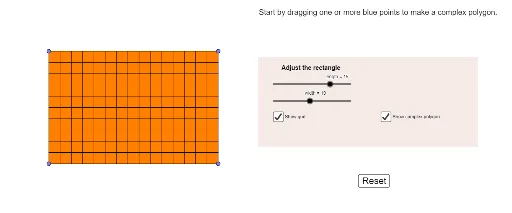
This example demonstrates how to construct and analyze the relationship between rectangle perimeters and distributions using GeoGebra. It involves core mathematical concepts such as perimeter calculation, integer applications, probability distributions, division, and logarithms. Key GeoGebra commands and objects used in the construction include Sequence, Polygon, Point, OrthogonalLine, Intersect, Perimeter, Segment, and Text. Suitable for middle school and above students to understand the integration of geometric properties and probability statistics.
GeoGebra Commands & Parameters
Sequence(Sequence[Point[{i, j}], i, ((-length)) / 2, length / 2, 1], j, ((-width)) / 2, width / 2, 1) → list1Polygon(A, B, C, D) → poly1, a, b, c, dPoint(list1) → EPoint(list1) → FPoint(list1) → GPoint(list1) → HOrthogonalLine(E, d) → eOrthogonalLine(E, a) → fOrthogonalLine(F, a) → gOrthogonalLine(F, b) → hOrthogonalLine(H, c) → iOrthogonalLine(H, d) → jOrthogonalLine(G, c) → kOrthogonalLine(G, b) → lIntersect(c, i) → IIntersect(j, d) → JIntersect(b, l) → KIntersect(g, a) → LIntersect(h, b) → MIntersect(k, c) → NIntersect(f, a) → PIntersect(e, d) → RPolygon(H, I, R, J, N, G, K, M, F, L, P, E) → poly2, h_1, e_1, r, j_1, i_1, n, g_1, k_1, m, f_1, l_1, pPerimeter(poly1) → oPerimeter(poly2) → qSequence(Segment[list1(i, 1), list1(i, length + 1)], i, 1, width + 1) → list2Sequence(Segment[list1(1, i), list1(width + 1, i)], i, 1, length + 1) → list3Segment((D * (1 - vertMove)) + (I * vertMove), (J * (1 - vertMove)) + (H * vertMove)) → topLeftVertSegment((C * (1 - horMove)) + (K * horMove), (N * (1 - horMove)) + (G * horMove)) → topRightHorSegment((C * (1 - vertMove)) + (N * vertMove), (K * (1 - vertMove)) + (G * vertMove)) → topRightVertSegment((B * (1 - vertMove)) + (L * vertMove), (M * (1 - vertMove)) + (F * vertMove)) → bottomRightVertSegment((A * (1 - vertMove)) + (P * vertMove), (R * (1 - vertMove)) + (E * vertMove)) → bottomLeftVertSegment((D * (1 - horMove)) + (J * horMove), (I * (1 - horMove)) + (H * horMove)) → topLeftHorSegment((A * (1 - horMove)) + (R * horMove), (P * (1 - horMove)) + (E * horMove)) → bottomLeftHorSegment((B * (1 - horMove)) + (M * horMove), (L * (1 - horMove)) + (F * horMove)) → bottomRightHorSegment(D, D + (Min[length, perimeterTimer], 0)) → topSegment(C, C - (0, ((perimeterTimer > length) * Min[width, perimeterTimer - length]))) → rightSegment(B, B - (((perimeterTimer > length + width) * Min[length, perimeterTimer - width - length]), 0)) → bottomSegment(A, A + (0, ((perimeterTimer > (2 * length) + width) * Min[width, perimeterTimer - (2 * length) - width]))) → leftText(d, Midpoint[d] + (-1, 0)) → leftWidthTextText(a, Midpoint[a] + (0, -1)) → bottomLengthTextText(Distance[R, L], Midpoint[R, L] - (0, 1)) → text1Text(Distance[P, M], Midpoint[P, M] - (0, 1)) → text2Text(Distance[I, K], Midpoint[I, K] + (0, 0.5)) → text3Text(Distance[J, N], Midpoint[J, N] + (0, 0.5)) → text4Text(topRightHor, Midpoint[topRightHor] + (0, 1 / 2)) → TRHtextText(topLeftHor, Midpoint[topLeftHor] + (0, 1 / 2)) → TLHtextText(bottomLeftHor, Midpoint[bottomLeftHor] + (0, -1)) → BLHtextText(Distance[P, L], Midpoint[P, L] + (0, -1)) → BMHtextText(bottomRightHor, Midpoint[bottomRightHor] + (0, -1)) → BRHtextText(Distance[R, D], Midpoint[R, D] + (-0.8, 0)) → text8Text(Distance[J, P], Midpoint[J, P] + (-0.8, 0)) → text6Text(Distance[J, R], Midpoint[J, R] + (-0.8, 0)) → text9Text(Distance[I, N], Midpoint[I, N] + (0, 1 / 2)) → topTextText(c, Midpoint[c] + (0, 1 / 2)) → topLengthTextText(Distance[K, M], Midpoint[K, M] + (1 / 2, 0)) → text10Text(Distance[K, B], Midpoint[K, B] + (1 / 2, 0)) → text13Text(Distance[M, C], Midpoint[M, C] + (1 / 2, 0)) → text14Text(b, Midpoint[b] + (1 / 2, 0)) → rightWidthTextText(Distance[N, G], Midpoint[topRightVert] + (1 / 2, 0)) → text11Text(Distance[I, H], Midpoint[topLeftVert] + (-0.8, 0)) → text5Text(Distance[F, L], Midpoint[bottomRightVert] + (1 / 2, 0)) → text12Text(Distance[E, P], Midpoint[bottomLeftVert] + (-0.8, 0)) → text7Segment(J, J + (Min[Distance[H, J], perimeterTimer], 0)) → p1Segment(H, H + (0, ((perimeterTimer > Distance[H, J]) * Min[Distance[I, H], perimeterTimer - Distance[H, J]]))) → p2Segment(I, I + (Min[Distance[I, N], perimeterTimer - p1 - p2], 0)) → p3Segment(N, N - (0, Min[Distance[G, N], perimeterTimer - p1 - p2 - p3])) → p4Segment(G, G + (Min[Distance[G, K], perimeterTimer - p1 - p2 - p3 - p4], 0)) → p5Segment(K, K + (0, (-Min[Distance[M, K], perimeterTimer - p1 - p2 - p3 - p4 - p5]))) → p6Segment(M, M + ((-Min[Distance[M, F], perimeterTimer - p1 - p2 - p3 - p4 - p5 - p6]), 0)) → p7Segment(F, F + (0, (-Min[Distance[F, L], perimeterTimer - p1 - p2 - p3 - p4 - p5 - p6 - p7]))) → p8Segment(L, L + ((-Min[Distance[L, P], perimeterTimer - p1 - p2 - p3 - p4 - p5 - p6 - p7 - p8]), 0)) → p9Segment(P, P + (0, Min[Distance[P, E], perimeterTimer - p1 - p2 - p3 - p4 - p5 - p6 - p7 - p8 - p9])) → p10Segment(E, E + ((-Min[Distance[E, R], perimeterTimer - p1 - p2 - p3 - p4 - p5 - p6 - p7 - p8 - p9 - p10]), 0)) → p11Segment(R, R + (0, Min[Distance[R, J], perimeterTimer - p1 - p2 - p3 - p4 - p5 - p6 - p7 - p8 - p9 - p10 - p11])) → p12Text(length, Midpoint[A, B] + (0, -1)) → bottomTextPolygon(O, Q, S, T) → q1, o_1, q_1, s_1, t_1
AI Drawing Prompt Reference
Draw a rectangle filled with a grid of evenly spaced points. Select four interior points, and from each draw perpendicular lines to the rectangle's sides, creating eight intersection points on the boundary. Connect these eight points and the four interior points in order to form an inscribed octagon. Label the perimeters of both the rectangle and the octagon. Inside the rectangle, draw horizontal and vertical segments connecting the grid points. Along the rectangle's sides, show dynamic segments that trace the perimeter, and label the lengths of the octagon's sides.
The prompt above was compiled from the original drawing commands and is for reference only.