
Conjugate Function Demo
Loading the math board and drawing, please wait…
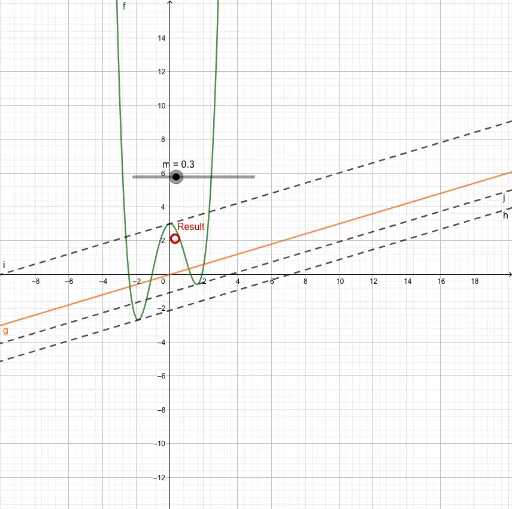
This example demonstrates how a conjugate function transforms a non-convex function into a convex one, visually illustrating key mathematical concepts such as conjugacy, convexity, and function transformation. It leverages GeoGebra commands like Root, Tangent, Intersect, Line, and Max, involving objects like functions f, g, tangents t_1/t_2/t_3, and points B/C/D. Ideal for high school and advanced learners exploring function properties and optimization problems in geometry and calculus.
GeoGebra Commands & Parameters
Root(Derivative[f] - m) → t_1, t_2, t_3Tangent(t_1, f) → hTangent(t_2, f) → iTangent(t_3, f) → jIntersect(f, h, 1) → BIntersect(f, j, 3) → CIntersect(f, i, 2) → DLine(B, yAxis) → kLine(D, yAxis) → lLine(C, yAxis) → nIntersect(g, k, 1) → EIntersect(g, l, 1) → FIntersect(g, n, 1) → GMax({If[Defined[y(E) - y(B)], y(E) - y(B), -100], If[Defined[y(F) - y(D)], y(F) - y(D), -100], If[Defined[y(G) - y(C)], y(G) - y(C), -100]}) → a
AI Drawing Prompt Reference
Draw a non-convex function and its conjugate function to show how the non-convex function transforms into a convex one via conjugacy. Start by plotting the non-convex function, then find its derivative and draw three tangent lines, intersecting the function at three points. Draw vertical lines through these points, plot the conjugate function, and mark the key intersections and maximum value.
The prompt above was compiled from the original drawing commands and is for reference only.