
Conic Sections by Nadezhda Konstantinova
Loading the math board and drawing, please wait…
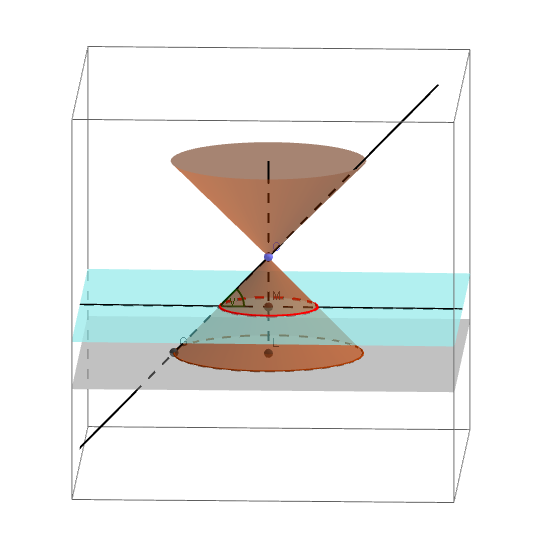
This example demonstrates the generation process of conic sections, including ellipses, parabolas, and hyperbolas. It involves basic concepts of conic sections and uses GeoGebra commands such as Point, Circle, Intersect, etc., to construct these curves. Suitable for high school mathematics education and learning.
GeoGebra Commands & Parameters
Point(yAxis) → ACircle(zAxis, A) → cIntersect(xAxis, c, 1) → EIntersect(xAxis, c) → F, GOrthogonalLine(G, xOyPlane) → jPoint(j) → JCircle(J, G, E) → kPoint(zAxis) → BCircle(B, 2, zAxis) → dCone(c, 2) → a_1, e, bCone(d, -2) → f, g, hPoint(zAxis) → DLine(D, yAxis) → iIntersect(j, d) → H,PointIn(h) → IPoint(k) → KPoint(g) → CPlane(K, C, B) → aRotate(K, 360, (0, 0, 0), xOyPlane) → K'Rotate(K, α, C, xOyPlane) → K'_1Rotate(K, α, C, xOyPlane) → K'_2Line(C, yAxis) → mPoint(m) → NLine(N, m) → nRotate(K, α, m) → K'_3Plane(K'_3, i) → lIntersectPath(l, xOyPlane) → pIntersectPath(l, b) → qIntersectPath(l, b) → rIntersect(yAxis, zAxis) → LSegment(B, L) → sIntersect(s, l) → MOrthogonalLine(M, p, l) → tIntersectPath(l, f) → c_1Corner(c_1) → O, PLine(G, C) → b_1Intersect(b_1, t) → QAngle(M, Q, C) → γ
AI Drawing Prompt Reference
Draw a cone with ellipses, parabolas, and hyperbolas. Start by drawing a circle on the coordinate axes, then construct these curves using intersections and tangents. Next, draw a cone and generate different curves and planes through rotations and intersections, and finally create the final shape through intersections and rotations.
The prompt above was compiled from the original drawing commands and is for reference only.