
Conic Sections by Bed Prasad Dhakal
Loading the math board and drawing, please wait…
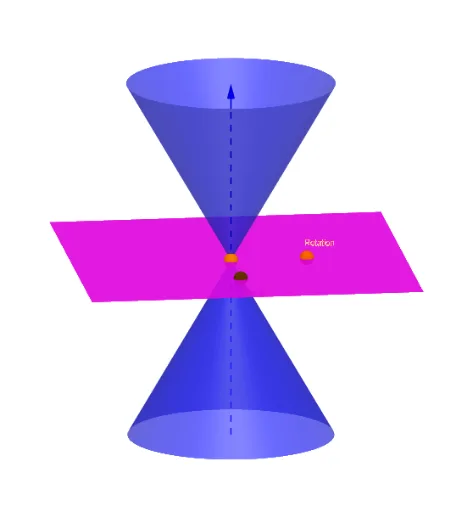
This example demonstrates the generation process of conic sections, including parabolas, ellipses, and hyperbolas. It involves core mathematical concepts such as conic sections. Using GeoGebra commands like OrthogonalLine, Point, Line, etc., it dynamically showcases the geometric properties of these curves. Suitable for high school mathematics education and learning.
GeoGebra Commands & Parameters
OrthogonalLine(M, xOyPlane) → aPoint(a) → MoveLine(A, yAxis) → gCircle(A, 16, xAxis) → cIntersect(g, c) → X_1, JIntersect(zAxis, c) → Z_1, Z_2CircleArc(A, X_1, Z_1) → fPoint(f) → RotationIf(j < 0, A + (0, (16 * cos(0)), (16 * sin(0))), If[j < π / 2 - α - 0.01, A + (0, (16 * cos(j)), (16 * sin(j))), If[j < π / 2 - α + 0.1, A + (0, (16 * cos(π / 2 - α)), (16 * sin(π / 2 - α))), If[j < π / 2 + 0.1, A + (0, (16 * cos(j - 0.1)), (16 * sin(j - 0.1))), If[j > π / 2 + 0.1, A + (0, (16 * cos(π / 2)), (16 * sin(π / 2)))]]]]) → XXIf(anim, XX, Rotation) → CPoint(zAxis) → HIntersect(zAxis, xAxis) → OLine(C, A) → dLine(A, Move) → bPlane(d, b) → eMirror(H, xOyPlane) → H'Point(zAxis) → IInfiniteCone(O, H, α) → mIntersectPath(e, m) → pVertex(p) → D, E, F, GAngle(C, A, Z_1) → βCircleArc(A, C, Z_1) → hCircle(A, 20, xAxis) → kRay(A, C) → iIntersect(i, k) → K,Textfield(β) → InputBox1
AI Drawing Prompt Reference
Draw a dynamic illustration showing the generation process of conic sections, including parabolas, ellipses, and hyperbolas, by intersecting a line with a cone and dynamically displaying the points of intersection to form these curves, with key points and lines labeled, and the angle value shown at the end.
The prompt above was compiled from the original drawing commands and is for reference only.