
Congruent Triangles Exploration by D Shea
Loading the math board and drawing, please wait…
In collections
Triangle Congruence
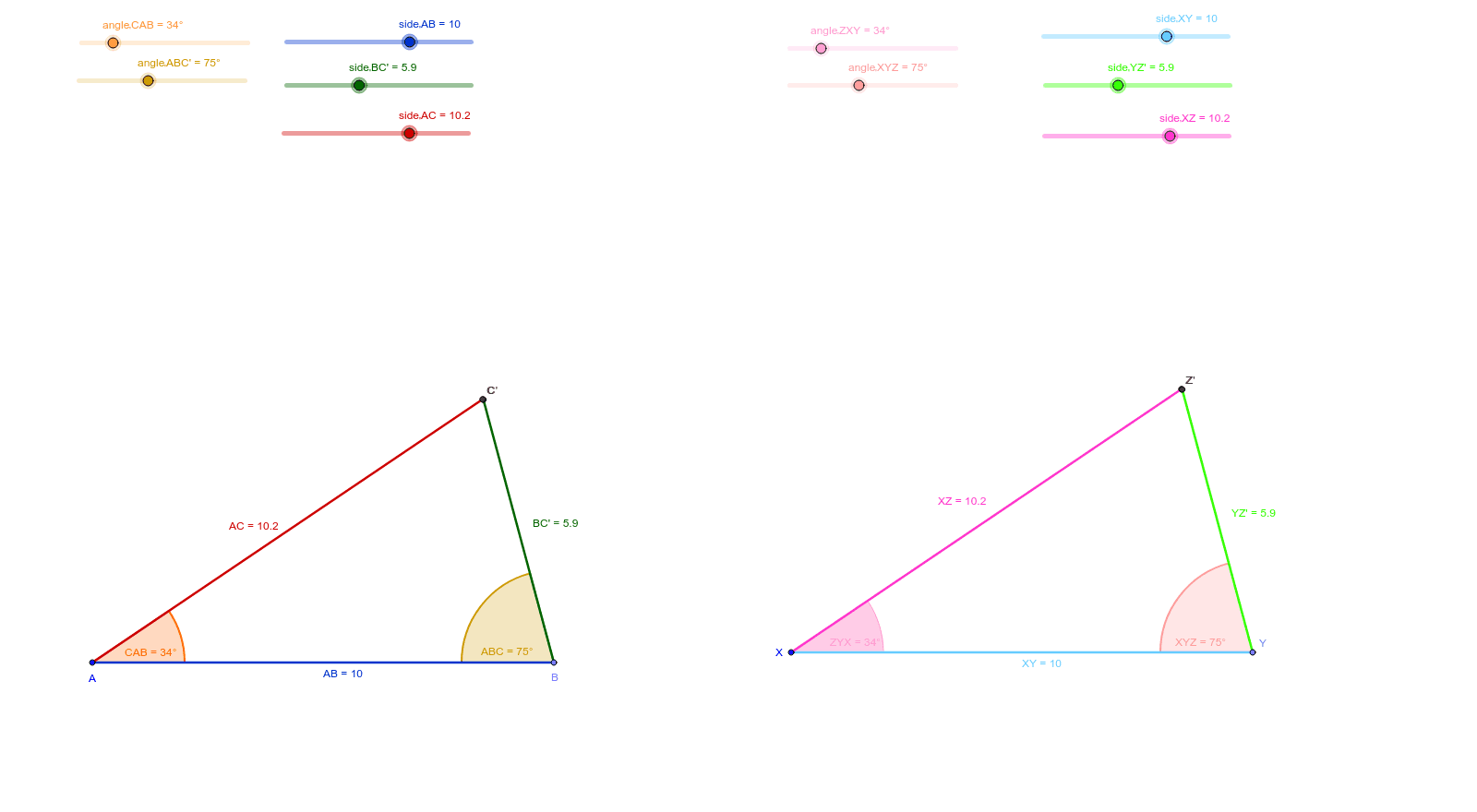
This example uses two interactive triangles to explore the theorems of congruent triangles. Key mathematical concepts include the conditions for triangle congruence. Using GeoGebra commands such as Point, Segment, Rotate, Angle, etc., students can dynamically adjust the shape and position of the triangles to observe congruence under different conditions. Suitable for middle school and above students to learn about geometric construction and theorems of congruent triangles.
GeoGebra Commands & Parameters
Point(Circle[A, abs(side_'AB)]) → BSegment(A, B) → ABRotate(B, angle_'CAB, A) → DAngle(B, A, D) → CABRotate(A, (-angle_'ABC'), B) → D'Angle(D', B, A) → ABCSegment(A, D) → AC_2Segment(B, D') → AC'Ray(B, D') → dCircle(B, side_'BC') → eIntersect(e, d, 1) → C'Segment(B, C') → BC'Ray(A, D) → fCircle(A, side_'AC) → gIntersect(g, f, 1) → CSegment(A, C) → ACPoint(Circle[X, abs(side_'XY)]) → YSegment(X, Y) → XYRotate(X, (-angle_'XYZ), Y) → E'Angle(E', Y, X) → XYZRotate(Y, angle_'ZXY, X) → F'Angle(Y, X, F') → ZYXRay(X, F') → bRay(Y, E') → hCircle(X, side_'XZ) → kIntersect(k, b, 1) → ZSegment(X, Z) → XZCircle(Y, side_'YZ') → pIntersect(p, h, 1) → Z'Segment(Y, Z') → YZ'
AI Drawing Prompt Reference
Draw two congruent triangles ABC and XYZ. Start by drawing a circle with center A and radius AB to determine point B. Then, rotate point B around A by angle CAB to get point D and connect AD. Next, rotate point A around B by angle ABC to get point D' and connect BD'. Finally, connect AD and BD' to determine point C' and connect BC'. Repeat the process with X as the center and XY as the radius to determine point Y. Then, rotate point Y around X by angle XYZ to get point E' and connect XE'. Next, rotate point X around Y by angle ZYX to get point F' and connect YF'. Finally, connect XE' and YF' to determine point Z' and connect YZ'.
The prompt above was compiled from the original drawing commands and is for reference only.