
Congruent Figures: Dynamic Illustration
Loading the math board and drawing, please wait…
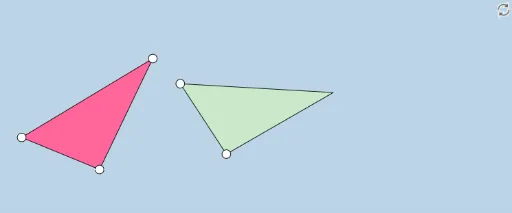
This GeoGebra example offers a dynamic and modifiable illustration of congruent figures, focusing on triangles to demonstrate the definition of congruence through transformations like translation and rotation. The construction utilizes commands such as Segment, Circle, Point, Angle, Rotate, Ray, Intersect, Line, Dilate, Vector, Polygon, Translate, If, and Mirror, creating objects that enable interactive manipulation. Key mathematical concepts include congruence, geometric transformations, angle equality, and corresponding sides. It is designed for middle school or high school geometry education, providing a hands-on way to explore congruence properties dynamically.
GeoGebra Commands & Parameters
Segment(A, B) → aSegment(B, C) → bSegment(C, A) → cCircle(D, (k * a)) → dPoint(d) → ESegment(D, E) → eCircle(E, (k * b)) → fAngle(A, B, C) → αRotate(D, α, E) → D'Angle(D, E, D') → βRay(E, D') → gIntersect(f, g, 1) → FAngle(C, A, B) → γRotate(E, (-γ), D) → E'Angle(E', D, E) → δRay(D, E') → hSegment(D, E') → iSegment(E', E) → jLine(E, D') → lLine(E, D') → nCircle(D, (k * c)) → pRay(D, E') → mIntersect(p, m, 1) → GSegment(E, G) → qSegment(D, G) → rDilate(D, If[0 < s ≤ 1, 1 - s], A) → D'_1Vector(D, D'_1) → uPolygon(A, C, B) → poly1, b_1, a_1, c_1Polygon(D, E, G) → poly2, g_1, d_1, e_1Translate(D, u) → D'_2Translate(E, u) → E'_1Translate(G, u) → G'Polygon(D'_2, E'_1, G') → poly2', g', d'_2, e'_1Vector(D, A) → vTranslate(D, v) → D'_3Translate(E, v) → E'_2Translate(G, v) → G'_1Polygon(D'_3, E'_2, G'_1) → poly2'_1, g'_1, d'_3, e'_2Segment(D'_1, G') → tSegment(E'_1, D'_1) → h_1Segment(A, G'_1) → i_1Segment(G'_1, E'_2) → j_1Segment(E'_2, A) → k_1Angle(C, A, E'_2) → εIf(ε > γ, ε - γ, γ - ε) → ζRotate(D'_3, If[1 < s ≤ 2, ((-(s - 1)) * ζ), (-ζ)], A) → HRotate(E'_2, If[1 < s ≤ 2, ((-(s - 1)) * ζ), (-ζ)], A) → IRotate(G'_1, If[1 < s ≤ 2, ((-(s - 1)) * ζ), (-ζ)], A) → JPolygon(H, I, J) → poly3, j_2, h_2, i_2Segment(A, J) → l_1Segment(A, I) → m_1Segment(I, J) → n_1Dilate(J, If[2 < s ≤ 3, 3 - s, 0], C) → J'Dilate(I, If[2 < s ≤ 3, 3 - s, 0], B) → I'Segment(I', J') → p_1Angle(A, I, J) → θAngle(D'_2, E'_1, G') → ιAngle(J, A, I) → λAngle(G', D'_1, E'_1) → μPolygon(A, J', I') → poly4, i', a_2, j'Segment(G'_1, E'_2) → q_1Segment(G', E'_1) → f_1Rotate(D'_3, ((s - 1) * ζ), A) → KRotate(D'_3, If[1 < s ≤ 2, ((s - 1) * ζ), ζ], A) → LRotate(E'_2, If[1 < s ≤ 2, ((s - 1) * ζ), ζ], A) → MRotate(G'_1, If[1 < s ≤ 2, ((s - 1) * ζ), ζ], A) → NPolygon(L, M, N) → poly5, n_2, l_2, m_2Dilate(M, If[2 < s ≤ 3, 3 - s, 0], B) → M'Dilate(N, If[2 < s ≤ 3, 3 - s, 0], C) → N'Segment(M', N') → r_1Polygon(A, M', N') → poly6, n', a_3, m'Angle(A, M', N') → οAngle(A, M, N) → ρSegment(A, M) → t_1Segment(M, N) → b_2Segment(A, N) → c_2Angle(B, A, C) → σAngle(G, E, D) → τAngle(N, M, A) → υAngle(N', M', A) → ϕLine(E, G) → s_1Mirror(D, q) → D'_4Mirror(E, q) → E'_3Mirror(G, q) → G'_2Polygon(D'_4, E'_3, G'_2) → poly2'_2, g'_2, d'_4, e'_3Segment(E, D'_4) → f_2Segment(D'_4, G) → g_2
AI Drawing Prompt Reference
Draw a dynamic illustration of congruent triangles: a fixed triangle and a second triangle constructed to be congruent using circles, rays, and intersections based on given side ratios and angles. Include a slider that drives three transformation stages: first dilate one vertex of the constructed triangle toward the corresponding vertex of the fixed triangle, then translate the whole triangle so the vertices coincide, finally rotate the triangle about that vertex until the two triangles perfectly overlap. Show both triangles, the construction circles, rays, intersection points, and the intermediate positions during the transformation.
The prompt above was compiled from the original drawing commands and is for reference only.