
Cone Section and Isosceles Triangle
Loading the math board and drawing, please wait…
In collections
intersection: surface-surface, curve-curve
intersection: surface-surface, curve-curve
intersection: surface-surface, curve-curve
intersection: surface-surface, curve-curve
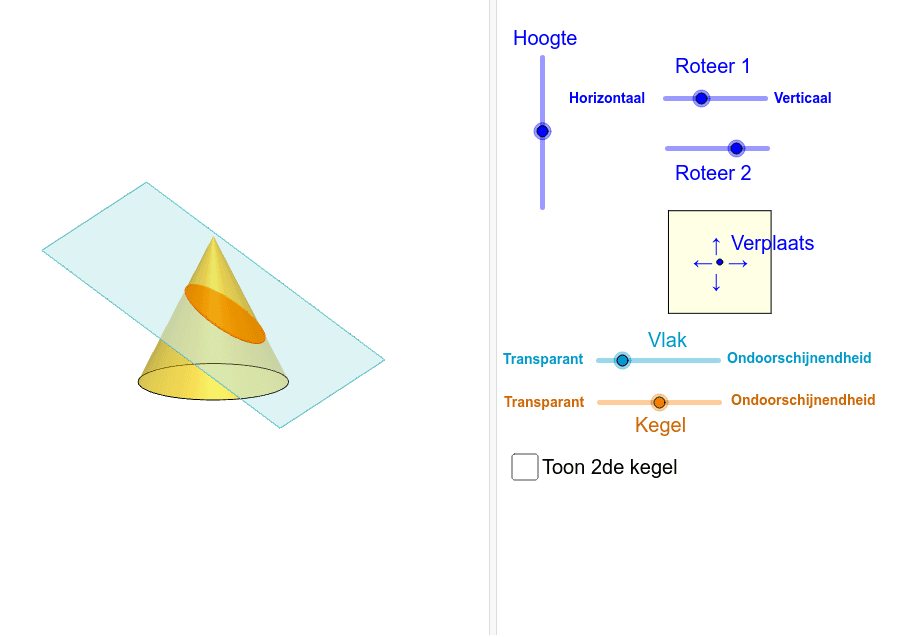
This example demonstrates the intersection of a cone with a plane to form a section, focusing on the generation of isosceles triangles. Key mathematical concepts include cone surfaces, section lines, properties of isosceles triangles, and the geometric meaning of centroids. GeoGebra commands used in construction include Polygon, PointIn, Translate, Rotate, Cone, Plane, IntersectPath, OrthogonalLine, Ends, Mirror, and QuadricSide. Suitable for high school solid geometry teaching to understand the section properties of spatial geometric bodies and the determination of isosceles triangles.
GeoGebra Commands & Parameters
Polygon(B + ((-2), (-2)), B + (2, (-2)), B + (2, 2), B + ((-2), 2)) → poly3, e, f, g, iPointIn(poly3) → CTranslate((0, 0, 0), Vector[B, C]) → APolygon(A + ((-4), (-4)), A + (4, (-4)), A + (4, 4), A + ((-4), 4)) → poly1, a, b, c, dRotate(Rotate[Translate[poly1, Vector[A, A + (0, 0, h)]], (90° * s), A + (0, 0, h), yAxis], (90° * t), A, zAxis) → poly2Rotate(D, 120*°, (0, 0, 0)) → ECone((0, 0, 0), (0, 0, 4), 2) → m, e_1, oPolygon(D, E, 3, xOyPlane) → poly4, j, k, l, FPointIn(poly2) → GPointIn(poly2) → HPointIn(poly2) → IPlane(G, I, H) → nIntersectPath(n, m) → poly6OrthogonalLine(A, n) → d_1Ends(m) → g_1, g_1_1Mirror(m, T) → m'QuadricSide(m') → o'IntersectPath(n, m') → f_1Ends(m') → h_1, h_1_1
AI Drawing Prompt Reference
Create a cone with its vertex at the origin, axis along the z‑axis, height 4 and base radius 2. Draw two squares of different sizes in the horizontal plane, translate the larger square upward and rotate it about the y‑ and z‑axes to obtain an inclined plane. Choose three points on this plane to define a cutting plane that intersects the cone, producing a conic section curve. On the curve pick two points and join them with the cone vertex to form an isosceles triangle, draw the perpendicular from the vertex to the cutting plane, and reflect the cone across a point to show the symmetric opposite section.
The prompt above was compiled from the original drawing commands and is for reference only.