
Cone Inside a Sphere Animation
Loading the math board and drawing, please wait…
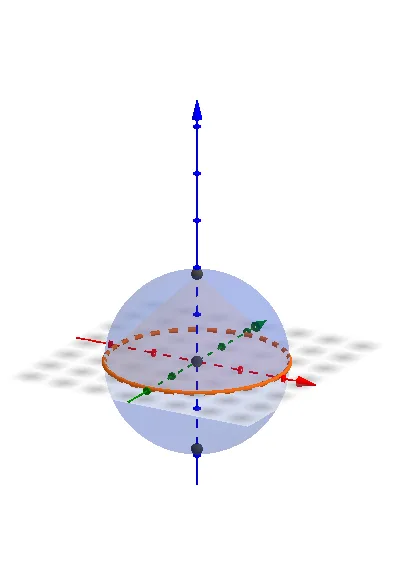
This example demonstrates a cone moving inside a sphere, showing how the cross‑section changes as the cone’s vertex slides over the spherical surface. Core mathematical concepts include solid geometry of sphere‑cone intersection, the Pythagorean theorem, and the use of derivatives and indefinite integrals for optimization, as well as parametric representation of the conical surface. Construction highlights: GeoGebra commands Sphere, Cone, and Intersect create the sphere, cone, and their intersection curve; objects a, A, b, B, C, c, d, e represent the sphere center, radius, cone vertex, base center, generatrix, and other key elements, driven by a slider for animation. Suitable for high‑school solid geometry, university calculus visualization, and geometric modeling or optimization demonstrations.
GeoGebra Commands & Parameters
Intersect(yAxis, zAxis) → ASphere(A, a) → bIntersect(zAxis, b) → B, CCone(A, C, a) → c, d, e
AI Drawing Prompt Reference
Create a 3D solid-geometry animation showing a cone moving inside a sphere. Use the coordinate axes as spatial reference to define the sphere’s center point, then build a sphere centered at that point with a controllable radius. Determine two intersection points between the sphere and relevant axis directions, and use the sphere center together with an intersection point to define a right circular cone (including its key elements such as the cone vertex and generatrix/side lines). Animate the cone by sliding its vertex over the spherical surface via a slider so that the sphere–cone cross-section (their intersection curve) updates continuously, clearly displaying the sphere, the cone surface, and the evolving intersection curve.
The prompt above was compiled from the original drawing commands and is for reference only.