
Cone inscribed in sphere
Loading the math board and drawing, please wait…
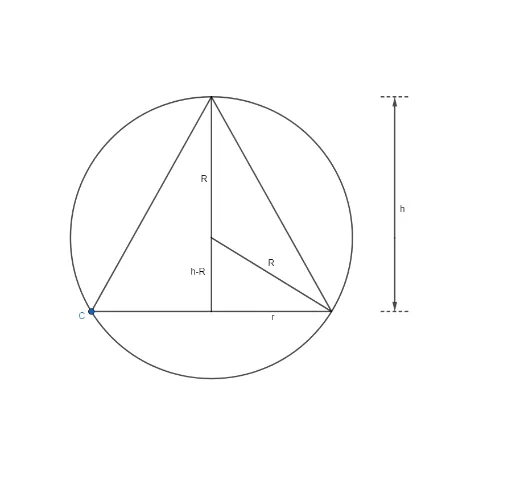
This example demonstrates the geometric construction and properties of a cone inscribed within a sphere. It involves core mathematical concepts such as solid geometry, circles, vectors, and geometric constructions. Key GeoGebra commands and objects used in the construction include Intersect, Circle, Point, Mirror, Segment, Midpoint, and Vector. Suitable for high school students and math enthusiasts to learn spatial geometry and construction skills.
GeoGebra Commands & Parameters
Intersect(xAxis, yAxis) → ACircle(A, 1) → cIntersect(c, yAxis, 2) → BPoint(c) → CMirror(C, yAxis) → C'Segment(B, C) → fSegment(B, C') → gSegment(C, C') → hIntersect(h, yAxis) → DSegment(B, A) → iSegment(A, D) → jSegment(A, C') → kMidpoint(E, F) → ISegment(E, F) → mVector(K, I) → uSegment(C3, C4) → lVector(K, C2) → vSegment(C, D) → nSegment(D, C') → p
AI Drawing Prompt Reference
Draw a sphere and inscribe a cone inside it such that the cone's base coincides with a circular cross-section of the sphere, and the cone's apex lies on the sphere's diameter. Start by drawing the circular cross-section, then find its intersection with the vertical axis. Use this intersection as the center to draw a unit circle. Connect this point to a point on the circle to form the cone's base. Locate the midpoint of the base and draw a vector from the sphere's center to this midpoint. Finally, connect the apex to all points on the base to complete the cone.
The prompt above was compiled from the original drawing commands and is for reference only.