
Cone and Cross Sections: Dynamic Exploration of Plane Cuts
Loading the math board and drawing, please wait…
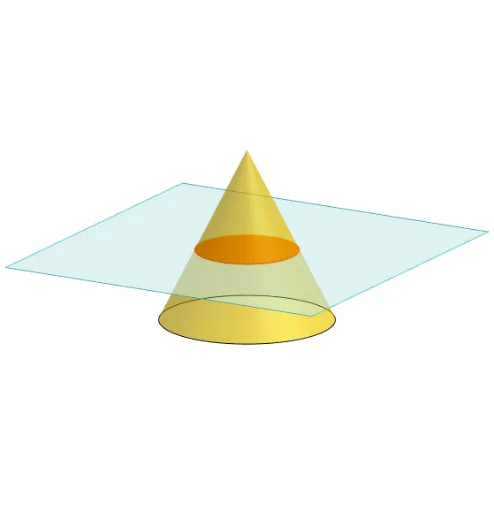
①This GeoGebra example dynamically demonstrates how different cross sections are formed when a cone is cut by various planes, visually revealing conic sections (circle, ellipse, parabola, hyperbola) as well as special shapes like triangles. ②Core mathematical concepts include solid geometry of cones, intersections of planes with curved surfaces, classification and properties of conic sections, and spatial relationships between planes, lines, and points. ③Construction highlights: using GeoGebra commands such as Polygon, PointIn, Translate, Rotate to build the cone's base and apex; Cone to create the 3D solid; Plane to define a movable cutting plane; IntersectPath to compute the intersection curve between the plane and cone surface; OrthogonalLine and Ends for auxiliary constructions; multiple text objects (text1 to text9) label key points and explanations. ④Suitable for high school solid geometry or analytic geometry classes to help students intuitively grasp the geometric origin of conic sections, and also useful for university-level spatial geometry demonstrations or interactive teacher-made materials.
GeoGebra Commands & Parameters
Polygon(B + (-2, -2), B + (2, -2), B + (2, 2), B + (-2, 2)) → poly3, e, f, g, iPointIn(poly3) → CTranslate((0, 0, 0), Vector[B, C]) → APolygon(A + (-4, -4), A + (4, -4), A + (4, 4), A + (-4, 4)) → poly1, a, b, c, dRotate(Rotate[Translate[poly1, Vector[A, A + (0, 0, h)]], (90° * s), A + (0, 0, h), yAxis], (90° * t), A, zAxis) → poly2Rotate(D, 120°, (0, 0, 0)) → ECone((0, 0, 0), (0, 0, 4), 2) → m, e_1, oPolygon(D, E, 3, xOyPlane) → poly4, j, k, l, FPointIn(poly2) → GPointIn(poly2) → HPointIn(poly2) → IPlane(G, I, H) → nIntersectPath(n, m) → poly6OrthogonalLine(A, n) → d_1Ends(m) → g_1, g_1_1
AI Drawing Prompt Reference
Draw a 3D cone with its base centered at the origin, apex directly above, base radius 2, and height 4. Place a rotatable cutting plane defined by three points on a movable rectangle, which is formed by translating and rotating a square from the base. The plane intersects the cone's lateral surface, producing a cross-section curve that can be a circle, ellipse, parabola, or hyperbola. Also draw a triangle on the base and label several key points and auxiliary lines to illustrate how different plane cuts yield different conic sections.
The prompt above was compiled from the original drawing commands and is for reference only.