
Triangular Pyramid and Cross Sections
Loading the math board and drawing, please wait…
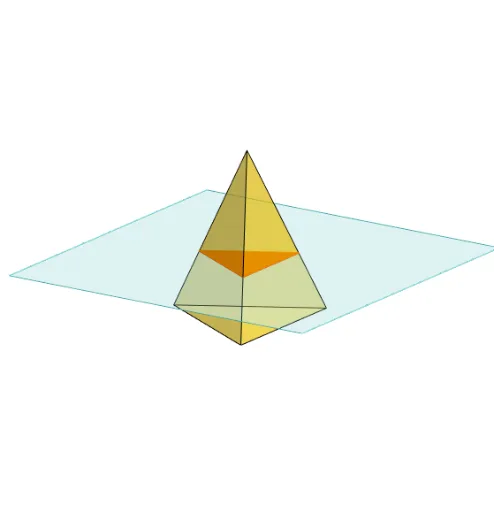
This example demonstrates the construction of a triangular pyramid and the analysis of its cross-sections. Key mathematical concepts include solid geometry, cross-sectional analysis, and geometric transformations. It utilizes commands like Polygon, PointIn, Translate, Rotate, Pyramid, Plane, IntersectPath, and OrthogonalLine in GeoGebra for creating the pyramid and its sections. Suitable for high school geometry education to understand the properties of 3D shapes' cross-sections.
GeoGebra Commands & Parameters
Polygon(B + (-2, -2), B + (2, -2), B + (2, 2), B + (-2, 2)) → poly3, e, f, g, iPointIn(poly3) → CTranslate((0, 0, 0), Vector[B, C]) → APolygon(A + (-4, -4), A + (4, -4), A + (4, 4), A + (-4, 4)) → poly1, a, b, c, dRotate(Rotate[Translate[poly1, Vector[A, A + (0, 0, h)]], (90° * s), A + (0, 0, h), yAxis], (90° * t), A, zAxis) → poly2Pyramid(Polygon[(-2, 0, 0), Rotate[(-2, 0, 0), 120°, zAxis], Rotate[(-2, 0, 0), -120°, zAxis]], (0, 0, 4)) → m, face1, face2, face3, edge1, edge2, edge3Rotate(D, 120°, (0, 0, 0)) → EPolygon(D, E, 3, xOyPlane) → poly4, j, k, l, FPointIn(poly2) → GPointIn(poly2) → HPointIn(poly2) → IPlane(G, I, H) → nIntersectPath(n, m) → poly6, poly5, r, a_1, b_1, c_1, K, L_1, O, P, J, L, p, qRotate(m, 0, zAxis) → m'Rotate(m, 0, zAxis) → m'_1OrthogonalLine(A, n) → d_1