
Cone Anatomy: Quick Exploration
Loading the math board and drawing, please wait…
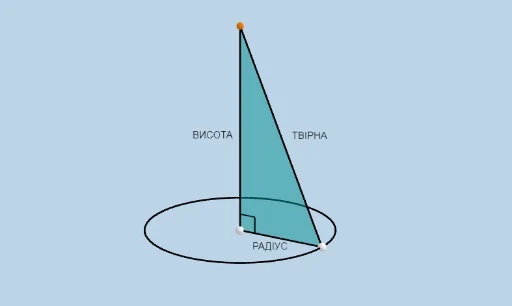
① This GeoGebra example dynamically visualizes the anatomical structure of a cone in 3D, including the base circle, apex, slant height, axial cross-section, and key angles, enabling learners to intuitively grasp the geometric composition of a cone. ② Core mathematical concepts involve solid geometry: definition of a cone, solids of revolution, slant height, height, base radius, axial cross-section (an isosceles triangle), and related angles (e.g., angle between slant height and base). ③ Construction highlights: the Cone command directly generates the cone, combined with Rotate, Polygon, Angle, Intersect, and Segment commands to build auxiliary elements; objects include radius r, height h, apex A, base center B, base circumference point C, slant segments a, c, b, d, axial triangle, angles α and β, and filled faces, allowing dynamic parameter adjustment to observe geometric relationships. ④ Suitable for upper secondary school (e.g., introductory geometry or high school solid geometry) teaching or self-study, useful for understanding cone generation, cross-section properties, and spatial reasoning, as well as an interactive demonstration tool for teachers.
GeoGebra Commands & Parameters
Cone(A, C, r) → a, c, bRotate(B, α, zAxis) → B'Polygon(B', A, C) → t1, c_1, b', a_1Angle(B', A, C) → βIntersect(xAxis, zAxis) → DSegment(A, B') → fSegment(B', C) → gIntersect(xAxis, zAxis) → ESegment(C, A) → i