
Conditional Probability with Two-Way Table
Loading the math board and drawing, please wait…
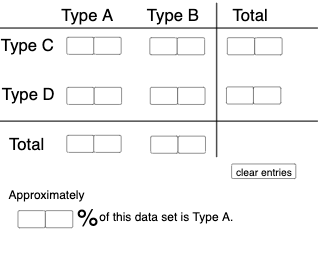
This example demonstrates how to use a two-way table to calculate conditional probability. It involves core concepts of probability and statistics. By inputting different data, observe how probabilities change. The construction uses commands like Textfield, Sequence, If, Segment, Translate, etc. Suitable for high school math education and students learning probability and statistics.
GeoGebra Commands & Parameters
Textfield(a) → InputBox1Textfield(b) → InputBox2Textfield(c) → InputBox3Textfield(d) → InputBox4Textfield(f) → InputBox6Textfield(g) → InputBox7Textfield(h) → InputBox8Textfield(i) → InputBox9Textfield(j) → InputBox10Textfield(k) → InputBox11Textfield(l) → InputBox12Textfield(m) → InputBox13Textfield(n) → InputBox14Textfield(o) → InputBox15Textfield(p) → InputBox16Textfield(q) → InputBox17Sequence(CountIf[x ≟ i, l1], i, 0, 9, 1) → l2, {0, 0, 0, 0, 0, 0, 0, 0, 0, 0}If(c1, "√", "X") → text2If(c2, "√", "X") → text3If(c3, "√", "X") → text4If(c4, "√", "X") → text5Segment((-5, 0), (12, 0)) → rTranslate(r, Vector[(0, 4.35)]) → r'Segment((7.3, -1.65), (7.3, 5.5)) → sIf(Max[l2] ≥ 4, "At least one digit occurs more than 3 times!", "Each digit occurs at most 3 times.") → text1Textfield(a_1) → InputBox5Textfield(a_2) → InputBox18If(c5, "√", "X") → text6
AI Drawing Prompt Reference
Draw a two-way table with 10 numbers, each appearing no more than 3 times. Input the frequency of each number in InputBox1 to InputBox17. Based on the input, determine if at least one number appears more than 3 times and display the result below. Draw a horizontal segment from (-5,0) to (12,0) with a length of 17.3 units, then translate it up by 4.35 units to draw a vertical segment from (7.3,-1.65) to (7.3,5.5).
The prompt above was compiled from the original drawing commands and is for reference only.