
Composite Solid Investigation (Mailbox? Backpack?)
Loading the math board and drawing, please wait…
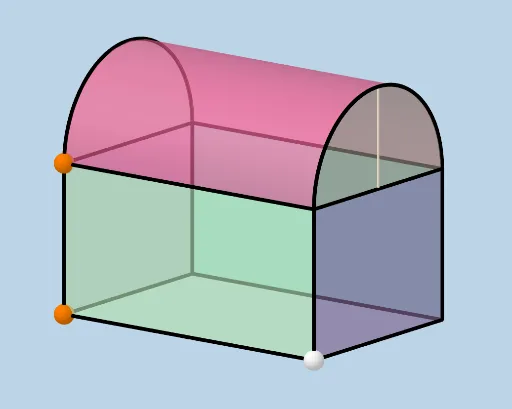
This example demonstrates the construction of a composite geometric solid (resembling a mailbox or backpack) and explores key volume and surface area calculations. Core math concepts include cylinder volume, normal distribution, parallelogram, vectors, power functions, and unit circle. Construction highlights the use of commands/objects like Segment, Ray, Point, Line, OrthogonalLine, Intersect, Vector, Translate, Midpoint, Sphere, CircleArc, Surface, CircleSector, Polygon in GeoGebra. Suitable for high school and above students for solid geometry learning and exploration.
GeoGebra Commands & Parameters
Segment(B, A) → fRay(A, C) → gPoint(g) → ELine(E, D) → hOrthogonalLine(B, h, space) → iIntersect(i, h) → FSegment(B, F) → jSegment(F, E) → kRay(A, G) → lPoint(l) → HVector(A, H) → uTranslate(E, u) → E'Translate(F, u) → F'Translate(B, u) → B'Midpoint(B', H) → IMidpoint(F', E') → JRay((0, 0, 0), (0, 0, 1)) → mSphere(I, H) → aIntersect(m, a) → K, LRay(D, J) → nSphere(J, E') → bIntersect(n, b) → M, NSegment(B', B) → pSegment(B', F') → qSegment(F', F) → sSegment(E, E') → tSegment(E', F') → cSegment(A, H) → dSegment(H, E') → eSegment(H, B') → f_1CircleArc(I, H, L) → c_1Intersect(m, c_1, 1) → OCircleArc(I, O, B') → d_1CircleArc(J, E', N) → e_1Point(e_1) → PCircleArc(J, P, F') → g_1Surface(x(I) + (r * cos(u)), y(I) + v, z(I) + (r * sin(u)), u, 0, π, v, y(I), y(J)) → oCircleSector(I, H, O) → h_1CircleSector(I, O, B') → k_1Polygon(B, A, H, B') → poly1, b_1, a_1, h_2, b'Polygon(A, E, E', H) → poly2, a_2, e_2, e', h_3CircleSector(J, N, E') → q_1CircleSector(J, F', N) → p_1Polygon(E, F, F', E') → poly3, e_3, f_2, f', e'_1Polygon(B, B', F', F) → poly4, b_2, b'_1, f'_1, f_3Segment(A, E) → i_1Segment(A, E) → j_1
AI Drawing Prompt Reference
Draw a composite solid shape resembling a mailbox or backpack, consisting of a cylinder, two arcs, two sectors, and four polygons. Start by creating the base of a cylinder, then add two arcs for decorative purposes on the top and bottom, followed by two sectors as side decorations. Finally, use four polygons to connect the parts, forming the overall shape.
The prompt above was compiled from the original drawing commands and is for reference only.