
Complex Roots Lab: Geometric Construction and Rotation Visualization
Loading the math board and drawing, please wait…
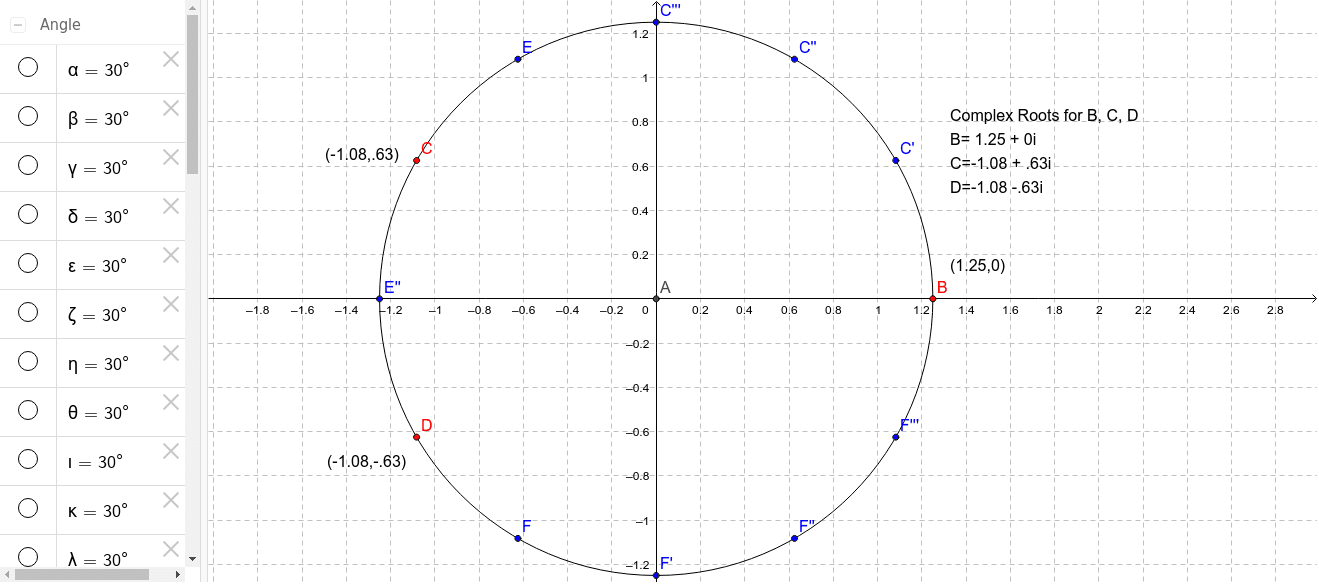
This GeoGebra example interactively demonstrates the geometric meaning of complex roots on the complex plane, using circles, rotations, and angle tools to transform complex arithmetic into intuitive visual operations. Core mathematical concepts include polar representation of complex numbers, root distribution on the unit circle, rotational symmetry, and angle measurement. Construction highlights involve the Intersect command for finding intersection points, Circle for constructing the unit circle, Rotate for implementing rotation corresponding to complex multiplication, and Angle for labeling angular relationships between roots; objects include multiple rotated points (such as C', C'', C''', etc.) and text labels, forming a complete visualization system for complex roots. Suitable for high school to university-level mathematics instruction, especially for classroom demonstrations of complex number operations, geometric transformations, and the integration of algebra and geometry, as well as for student self-exploration of the symmetry patterns of complex roots.
GeoGebra Commands & Parameters
Intersect(xAxis, yAxis) → D_1Circle(D_1, B) → cRotate(B, 30*°, D_1) → C'Angle(B, D_1, C') → αRotate(C', 30*°, D_1) → C''Angle(C', D_1, C'') → βRotate(C'', 30*°, D_1) → C'''Angle(C'', D_1, C''') → γRotate(C''', 30*°, D_1) → EAngle(C''', D_1, E) → δRotate(E, 30*°, D_1) → CAngle(E, D_1, C) → εRotate(C, 30*°, D_1) → E''Angle(C, D_1, E'') → ζRotate(E'', 30*°, D_1) → DAngle(E'', D_1, D) → ηRotate(D, 30*°, D_1) → FAngle(D, D_1, F) → θRotate(F, 30*°, D_1) → F'Angle(F, D_1, F') → ιRotate(F', 30*°, D_1) → F''Angle(F', D_1, F'') → κRotate(F'', 30*°, D_1) → F'''Angle(F'', D_1, F''') → λIntersect(xAxis, yAxis) → A
AI Drawing Prompt Reference
Draw the geometric construction of complex roots by first creating a unit circle centered at the origin, then rotating point B around the origin by 30 degrees each time to generate a series of rotated points C', C'', C''' etc., and label the angles α, β, γ etc. for each rotation, and finally find point A at the intersection of the x-axis and y-axis.
The prompt above was compiled from the original drawing commands and is for reference only.