
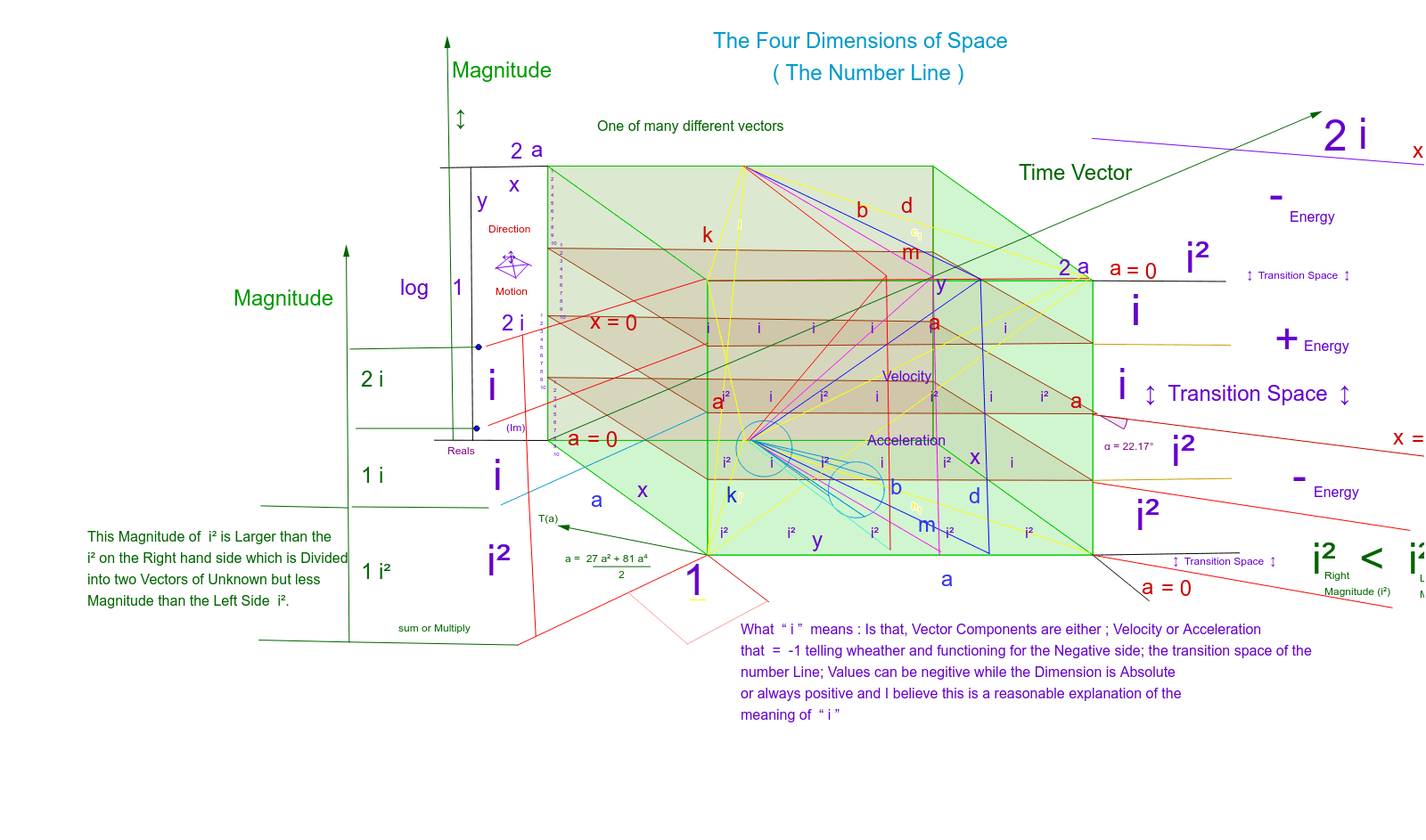
Complex Number Line in Four Dimensions
Loading the math board and drawing, please wait…
In collections
Complex Math
This example demonstrates the geometric representation of the complex number line. It involves basic concepts of complex numbers such as real and imaginary parts. Using GeoGebra commands like OrthogonalLine, Intersect, and Polygon, one can dynamically explore the properties of the complex number line. Suitable for high school mathematics education and learning.
GeoGebra Commands & Parameters
OrthogonalLine(A, yAxis) → aOrthogonalLine(B, yAxis) → bOrthogonalLine(C, xAxis) → cOrthogonalLine(D, xAxis) → dIntersect(b, c) → EIntersect(b, d) → FIntersect(a, d) → GIntersect(a, c) → HPolygon(E, F, G, H) → poly1, e, f, g, hVector(I, J) → uTranslate(E, u) → E'Translate(F, u) → F'Translate(G, u) → G'Translate(H, u) → H'Polygon(E', F', G', H') → poly1', e', f', g', h'Intersect(e', f') → KIntersect(e, f) → LIntersect(e, h) → MIntersect(e', h') → NPolygon(K, L, M, N) → poly2, k, l, m, nIntersect(f', g') → OIntersect(f, g) → PIntersect(g, h) → QIntersect(g', h') → RPolygon(O, P, Q, R) → poly3, o, p, q, rIntersect(e, h) → SIntersect(e', h') → TIntersect(g', h') → UIntersect(g, h) → VPolygon(S, T, U, V) → poly4, s, t, u_1, vIntersect(e, f) → WIntersect(e', f') → ZIntersect(f', g') → A_1Intersect(f, g) → B_1Polygon(W, Z, A_1, B_1) → poly5, w, z_1, a_1, b_1Intersect(e, h) → C_1Intersect(f', g') → D_1Vector(C_1, D_1) → iPoint(h) → K_1Point(f) → L_1Point(h') → N_1Polygon(K_1, L_1, M_1, N_1) → poly6, k_1, l_1, m_1, n_1Point(h) → O_1Point(f) → P_1Point(h') → R_1Polygon(O_1, P_1, Q_1, R_1) → poly7, o_1, p_1, q_1, r_1Point(h) → S_1Point(f) → T_1Point(f') → U_1Point(h') → V_1Polygon(S_1, T_1, U_1, V_1) → poly8, s_1, t_1, u_2, v_1Intersect(g', h') → W_1Point(g) → Z_1Segment(W_1, Z_1) → jPoint(o) → A_2Segment(Z_1, A_2) → c_1Segment(W_1, A_2) → d_1Segment(Z_1, B_2) → e_1Point(g) → C_2Intersect(t_1, d_1) → D_2Segment(C_2, D_2) → f_1Point(f) → L_2Segment(K_2, L_2) → g_1Vector(M_2, N_2) → w_1Translate(Z_1, w_1) → O_2Translate(A_2, w_1) → P_2Segment(O_2, P_2) → h_1Vector(Q_2, R_2) → i_1Translate(W_1, i_1) → S_2Translate(Z_1, i_1) → T_2Segment(S_2, T_2) → j'Vector(U_2, V_2) → j_1Translate(Z_1, j_1) → W_2Translate(B_2, j_1) → Z_2Segment(W_2, Z_2) → a_2Vector(A_3, B_3) → v_2Translate(C_2, v_2) → C_3Translate(D_2, v_2) → D_3Segment(C_3, D_3) → b_2Vector(E_3, F_3) → w_2Translate(K_2, w_2) → G_3Translate(L_2, w_2) → H_3Segment(G_3, H_3) → c_2Point(e) → I_3Point(o) → J_3Segment(I_3, J_3) → d_2Point(e) → K_3Intersect(t_1, f_1) → L_3Segment(K_3, L_3) → e_2Point(e) → M_3Point(f) → N_3Segment(M_3, N_3) → f_2Point(e) → O_3Point(e_1) → P_3Segment(O_3, P_3) → g_2Point(e) → Q_3Intersect(g', h') → R_3Segment(Q_3, R_3) → h_2Intersect(e, h) → S_3Segment(S_3, T_3) → i_2Intersect(g, h) → U_3Segment(U_3, V_3) → j_2Intersect(e', f') → W_3Segment(W_3, Z_3) → k_2Intersect(e', h') → A_4Segment(A_4, B_4) → l_2Intersect(e', h') → C_4Point(i_2) → E_4Point(j_2) → F_4Segment(E_4, F_4) → n_2Intersect(f', g') → G_4Segment(G_4, H_4) → p_2Point(f') → I_4Segment(I_4, J_4) → q_2Point(f') → K_4Segment(K_4, L_4) → r_2Intersect(e', f') → M_4Segment(M_4, N_4) → s_2Point(f') → O_4Segment(O_4, P_4) → t_2Point(i_2) → Q_4Vector(Q_4, R_4) → u_3Intersect(e, h) → S_4Vector(S_4, T_4) → v_3Point(h') → U_4Segment(U_4, V_4) → a_3Intersect(e', h') → W_4Segment(W_4, Z_4) → b_3Point(a_3) → A_5Point(b_3) → B_5Segment(A_5, B_5) → c_3Point(h') → C_5Segment(C_5, D_5) → d_3Point(q) → E_5Segment(E_5, F_5) → e_3Intersect(a_3, c_3) → G_5Point(e_3) → H_5Segment(G_5, H_5) → f_3Intersect(c_1, d_1) → K_5Intersect(e', h') → L_5Segment(K_5, L_5) → h_3Intersect(t_1, d_1) → M_5Point(b_2) → N_5Segment(M_5, N_5) → i_3Point(f) → O_5Point(e') → P_5Segment(O_5, P_5) → j_3Intersect(e_1, g_2) → Q_5Point(a_2) → R_5Segment(Q_5, R_5) → k_3Point(g) → S_5Segment(L_5, S_5) → l_3Point(b_2) → T_5Circle(T_5, U_5) → p_3Vector(V_5, W_5) → w_3Translate(p_3, w_3) → q_3Point(e) → Z_5Segment(U_5, Z_5) → m_3Intersect(p_3, m_1, 1) → A_6Segment(A_6, Z_5) → n_3Point(p_3) → B_6Segment(B_6, Z_5) → r_3Point(p_3) → C_6Segment(C_6, Z_5) → s_3Segment(C_6, Z_5) → t_3Angle(p_1, t_2) → αPoint(l_2) → D_6Segment(D_6, E_6) → a_4Point(b_3) → F_6Segment(E_6, F_6) → b_4Segment(G_6, H_6) → c_4Segment(K_6, L_6) → d_4Segment(K_6, M_6) → e_4Segment(K_6, N_6) → f_4Point(d_4) → O_6Point(e_4) → P_6Segment(O_6, P_6) → h_4Point(f_4) → Q_6Segment(P_6, Q_6) → i_4Segment(Q_6, O_6) → j_4Segment(R_7, T_7) → g_4Intersect(e', h') → U_6Vector(U_6, V_6) → u_4Segment(W_6, Z_6) → m_2Segment(A_7, B_7) → g_3Point(b_3) → C_7Segment(C_7, D_7) → k_4Segment(E_7, F_7) → l_4Segment(G_7, H_7) → m_4Point(k_4) → I_7Vector(I_7, J_7) → v_4Point(v_4) → K_7Segment(K_7, L_7) → n_4Segment(I_7, M_7) → p_4Point(f') → N_7Segment(N_7, O_7) → q_4Intersect(e', f') → P_7Segment(P_7, Q_7) → r_4
AI Drawing Prompt Reference
Draw a geometric representation of a four-dimensional complex number line. Start by creating two lines a and b perpendicular to the y-axis, and two lines c and d perpendicular to the x-axis. Find the intersections of these lines to get points E, F, G, and H, and then construct a quadrilateral using these points. Next, use translations and rotations of these points to construct a series of new quadrilaterals. Finally, use these new quadrilaterals to construct more complex geometric shapes.
The prompt above was compiled from the original drawing commands and is for reference only.