
Complex Number Arithmetic and Geometry: Visualizing on the Argand Diagram
Loading the math board and drawing, please wait…
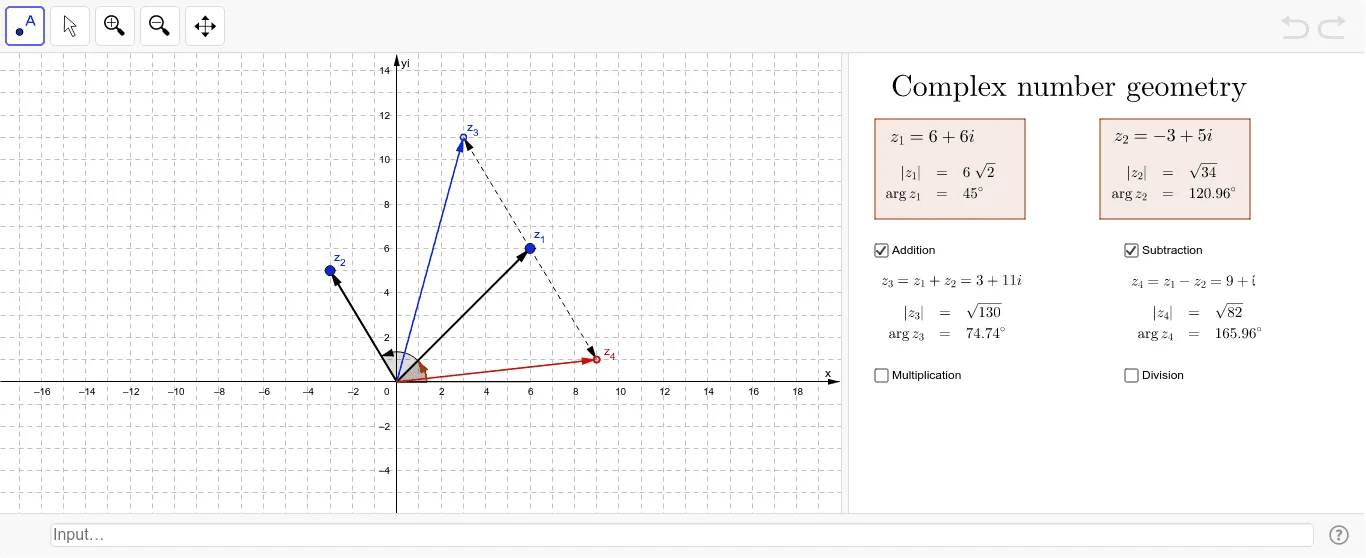
This interactive applet demonstrates the deep connection between arithmetic operations on complex numbers (addition, multiplication, conjugation, etc.) and their corresponding geometric transformations (translation, rotation, scaling) on the Argand diagram. Core mathematical concepts include algebraic representation of complex numbers, vector interpretation in the complex plane, modulus and argument, and geometric constructions involving triangles and circles. The construction uses GeoGebra commands such as Intersect, Vector, Translate, Segment, Angle, and Polygon to build complex points and geometric shapes, with SurdText for exact radical values and dynamic objects like Length and Point. Suitable for high school or undergraduate students learning complex numbers and coordinate geometry, as well as for teachers demonstrating the geometric meaning of complex arithmetic in class.
GeoGebra Commands & Parameters
Intersect(xAxis, yAxis) → BVector(B, z_1) → uVector(B, C) → z_2Translate(z_1, z_2) → A'Vector(z_1, A') → z_{33}SurdText(f_1) → r_1SurdText(f_2) → r_2SurdText(f_5) → r_5Vector(B, z_5) → z_{55}Vector(B, z_6) → vLength(z_6) → f_6SurdText(f_6) → r_6Length(z_3) → f_3SurdText(f_3) → r_3Translate(z_1, z_{22}) → AVector(z_1, A) → wVector(B, z_4) → zLength(z_4) → f_4SurdText(f_4) → r_4Point(xAxis) → DSegment(B, D) → eSegment(B, C) → fAngle(D, B, C) → αSegment(B, z_1) → gAngle(D, B, z_1) → βPolygon(E, F, G, H) → poly1, e_1, f_7, g_5, hPolygon(I, J, K, L) → poly2, i, j, k, l
AI Drawing Prompt Reference
Draw an Argand diagram with an origin. From the origin, draw vectors representing two complex numbers. Use one vector to translate the other complex point, creating a new point, and connect the original and translated points with a vector. Add several more complex points with vectors from the origin, and draw segments from the origin to each point, displaying their lengths as radical expressions. Place a point on the horizontal axis, draw segments from it to the origin and to one complex point, and mark the angle between these segments. Finally, connect two sets of four points to form two quadrilaterals, showing their side lengths.
The prompt above was compiled from the original drawing commands and is for reference only.