
Complex integration: z^i
Loading the math board and drawing, please wait…
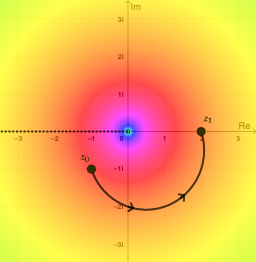
This example demonstrates the geometric and analytical properties of the complex integral z^i. Key mathematical concepts include complex numbers, complex integration, and complex functions. Construction involves GeoGebra commands such as SelectedIndex, Midpoint, Distance, Element, Segment, Derivative, etc. Suitable for high school students or undergraduate students learning complex analysis fundamentals.
GeoGebra Commands & Parameters
SelectedIndex(pathNames) → pathIndexMidpoint(A, B) → MDistance(A, B) → distABElement(pathList, pathIndex) → pathSegment(path(0.3), path(0.3 + 0.01)) → arrow1Segment(path(0.6), path(0.6 + 0.01)) → arrow2Element(X, pathIndex) → ReztElement(Y, pathIndex) → ImztDerivative(Rezt, t) → dReztDerivative(Imzt, t) → dImztSelectedIndex(plotNames) → plotIndexRay((0, 0), (-1, 0)) → brachCutSelectedIndex(branchNames) → branchIndex
AI Drawing Prompt Reference
Draw the integral graph of z^i, including the geometric and analytical properties of complex numbers, complex integration, and complex functions. First, draw a complex path on the complex plane, then calculate the real and imaginary parts at each point on the path, next find the derivatives of the real and imaginary parts, and finally draw the branch cut line.
The prompt above was compiled from the original drawing commands and is for reference only.