
Compass-and-straightedge construction of a segment’s midpoint
Loading the math board and drawing, please wait…
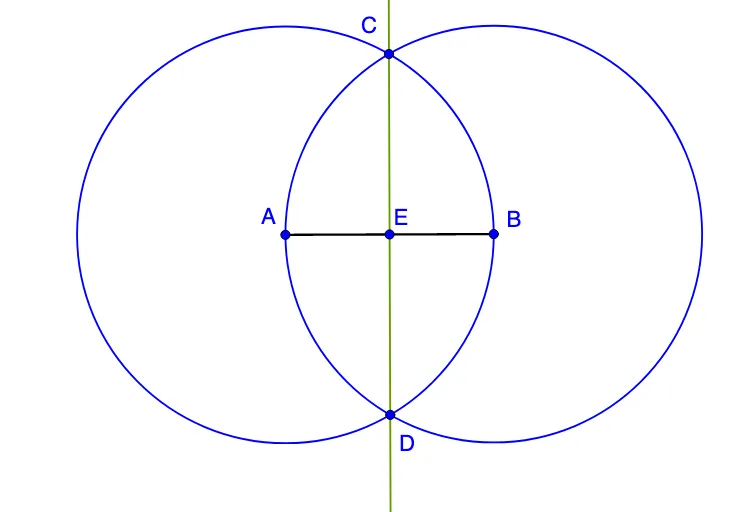
This example demonstrates how to construct the midpoint of a given segment using only circles and their intersections. The key mathematical ideas are the midpoint’s equidistance property, the fact that two circles with equal radii centered at the segment’s endpoints intersect at points that enable the midpoint to be determined, and the use of lines through those intersection points to locate the exact center. In GeoGebra, the construction starts with Segment to define the segment AB (objects A, B). Then Circle is used to draw equal-radius circles centered at the endpoints (objects a, b). Intersect computes the intersection points of the two circles (objects C, D). Finally, Line draws the required lines through the relevant points (objects c, d), from which the midpoint (object E) is identified. Suitable for middle and high school geometry, especially for compass-straightedge construction practice and related problem solving.
GeoGebra Commands & Parameters
Segment(A, B) → aCircle(A, B) → cCircle(B, A) → dIntersect(c, d, 1) → CIntersect(c, d, 2) → DLine(C, D) → bIntersect(b, a) → E
AI Drawing Prompt Reference
Draw the midpoint of a line segment AB. Start by drawing two circles with equal radii centered at A and B. Then find the intersection points C and D of these circles. Next, draw a line through C and D, which intersects the original line segment AB at point E. E is the midpoint of AB. The entire figure should clearly show these steps and relationships.
The prompt above was compiled from the original drawing commands and is for reference only.