
Comparing Rational Numbers Using a Number Line
Loading the math board and drawing, please wait…
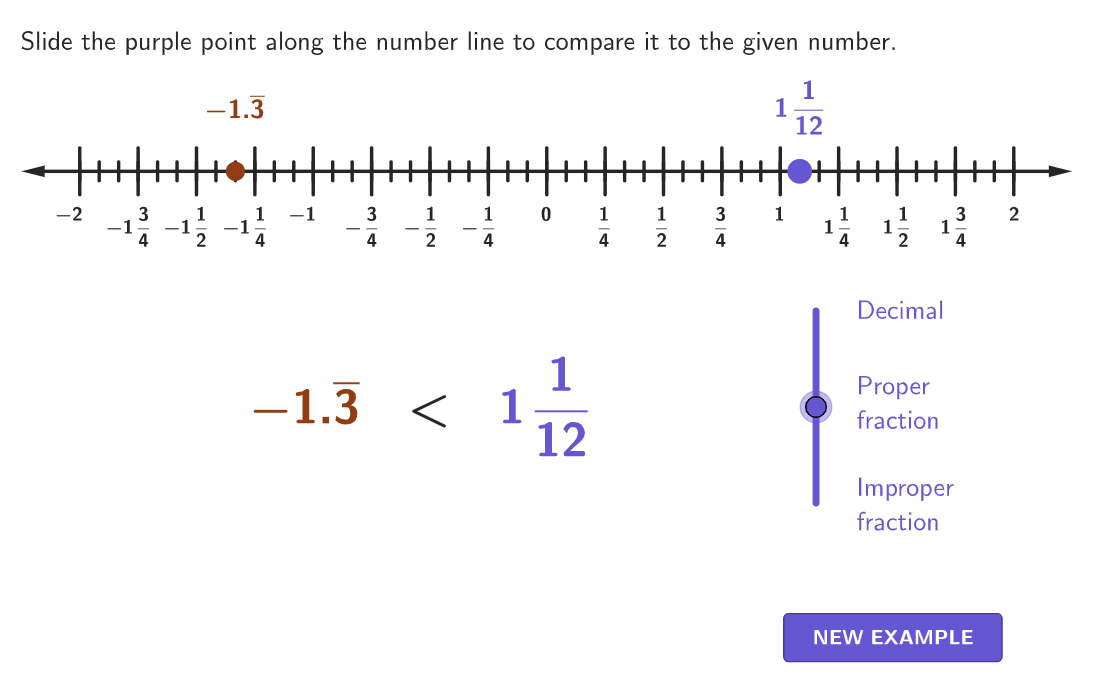
Demonstrate how to compare rational numbers using a number line in this activity. Covers core math concepts like rational number definitions, number line usage, and rational number ordering. Constructed with GeoGebra commands such as numberLine, textNumberLineDecimal, textNumberLineFraction, slider. Suitable for grades 6-8 students learning to compare and order rational numbers.
GeoGebra Commands & Parameters
Shuffle(Sequence[Random[-18, 18] / 12, i, 1, 100]) → randomNums, {-1.3333333333333333, -0.25, 0.5833333333333334, 0.4166666666666667, 0.16666666666666666, 0, 1.5, 0.6666666666666666, 0.8333333333333334, 1, -0.08333333333333333, 0.25, 0.25, 0.16666666666666666, 1.5, -0.8333333333333334, 0.5833333333333334, -0.9166666666666666, -0.08333333333333333, 0, -0.8333333333333334, 1.3333333333333333, -0.5, 0.3333333333333333, -1.1666666666666667, 1.3333333333333333, 0.8333333333333334, 0.4166666666666667, 0.5833333333333334, -0.75, 1.25, 0.08333333333333333, -0.5, -0.8333333333333334, 0.08333333333333333, 0.25, -1.3333333333333333, -1.0833333333333333, 0.4166666666666667, 0, -0.8333333333333334, 1.5, 1, -1.3333333333333333, -0.9166666666666666, 0.16666666666666666, 0.4166666666666667, 1.0833333333333333, 0.4166666666666667, 0.25, -1.1666666666666667, 0.4166666666666667, -0.3333333333333333, 1.1666666666666667, 0.25, -0.25, 0.25, -1.5, 0.6666666666666666, 0.5833333333333334, -0.9166666666666666, 0.6666666666666666, -1.3333333333333333, 0.4166666666666667, -1.3333333333333333, 1.25, 1, -0.8333333333333334, 0.16666666666666666, 0.75, -0.25, 1.3333333333333333, 0.5833333333333334, 0.5, -0.08333333333333333, -0.08333333333333333, -1.5, 0.3333333333333333, 0.9166666666666666, -1.3333333333333333, -0.5833333333333334, -1.1666666666666667, -0.3333333333333333, 0, 1.5, 1.4166666666666667, 0.4166666666666667, -0.4166666666666667, 0.5, 1.1666666666666667, 0.25, -1.3333333333333333, -0.3333333333333333, 1.1666666666666667, 0.8333333333333334, -1.0833333333333333, 0.8333333333333334, -1.0833333333333333, -0.6666666666666666, 1.4166666666666667}Element(randomNums, Mod[count, 100] + 1) → randomNumShuffle(Sequence[Random[0, 2], i, 1, 100]) → randomForms, {2, 0, 0, 2, 2, 1, 2, 0, 0, 2, 1, 2, 2, 1, 1, 2, 2, 2, 0, 0, 0, 1, 2, 2, 0, 1, 1, 1, 1, 2, 1, 2, 1, 1, 0, 1, 1, 0, 2, 0, 1, 1, 1, 1, 2, 0, 1, 2, 0, 1, 0, 0, 1, 0, 1, 0, 2, 2, 0, 2, 1, 2, 1, 1, 0, 2, 1, 1, 1, 2, 1, 0, 0, 2, 2, 2, 2, 1, 0, 0, 0, 2, 0, 2, 1, 0, 1, 2, 1, 2, 2, 1, 0, 2, 1, 0, 0, 1, 0, 1}Element(randomForms, Mod[count, 100] + 1) → randomFormSequence(i, i, minX, maxX, 1 / 12) → allXPoint(Zip[(A, 0), A, allX]) → MovingPointShuffle(Sequence[-10, 10]) → numberOptions, {-10, -5, 3, -4, -2, 5, 9, 4, -8, 8, 0, 10, 6, 7, -9, 1, -6, -3, -1, -7, 2}Sort(Take[numberOptions, 1, 3]) → orderedNumbersSequence(i, i, minX, maxX, 1 / 4) → displayXZip(Segment[(A, -0.1), (A, 0.1)], A, displayX) → numberLineBigTicksZip(Segment[(A, -0.04), (A, 0.04)], A, allX) → numberLineSmallTicksZip(Text[(("" * If[A < 0, "-", ""]) * abs(A)), (A - 0.022, -0.1) + If[A < 0, 0, (0.04, 0)], true, true, 0, -1], A, displayX) → textNumberLineDecimalZip(Text[(("" * If[A < 0, "-", ""]) * FractionText[abs(A)]), (A - 0.022, -0.1) + If[A < 0, 0, (0.04, 0)], true, true, 0, -1], A, displayX) → textNumberLineFractionCorner(5) → DimsIf(sliderFormat ≟ 0, Text[If[numberMovingPoint < 0, "\[-", "\["] + (FractionText[abs(numberMovingPoint)]) + "\]", (0, 0), true, true], sliderFormat ≟ 2, barNotation[numberMovingPoint], textMovingProper) → textMovingPointIf(randomForm ≟ 0, textFixedImproper, randomForm ≟ 2, barNotation[randomNum], textFixedProper) → textFixedPointSequence(i, i, -2, 2, 1 / 12) → numberLineValsZip(floor(n), n, allX) → numberLineWholesZip(Text[(("" * If[A < 0, "-", ""]) * If[A ≠ 0, properFraction[abs(A)], "0"]), (A - 0.022, -0.1) + If[A < 0, 0, (0.04, 0)], true, true, 0, -1], A, displayX) → textNumberLineProperIf(sliderFormat ≟ 0, textNumberLineFraction, sliderFormat ≟ 1, textNumberLineProper, textNumberLineDecimal) → numberLineDigitsmakeBox(MovingPoint + (((-wh)) / 2, wh), wh, wh) → movingCenterBoxmakeBox(RandomPoint + (((-wh)) / 2, wh), wh, wh) → fixedCenterBox
AI Drawing Prompt Reference
Draw a number line from -2 to 2 with 12 evenly spaced ticks. Randomly select a point on the number line as the moving point and another point as the fixed point. Mark both points with different colors and display their values in decimal, fraction, and proper fraction forms. Also, show the integer points on the number line and label each with the corresponding value.
The prompt above was compiled from the original drawing commands and is for reference only.