
Match Integers on a Number Line: Compare and Order
Loading the math board and drawing, please wait…
In collections
Negative Zahlen - Einführung
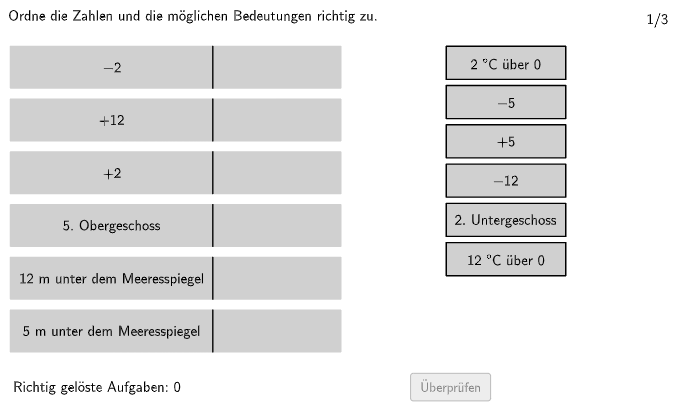
This GeoGebra example uses an interactive “assign/match correctly (Ordne zu!)” task to help learners compare and order integers by visually interpreting their relative positions on a number line. It focuses on integer number sense: determining which integer is greater/less, ordering them, and interpreting positive and negative integers in meaningful (non-mathematical) contexts. Construction and interaction are built with GeoGebra tools such as Polygon for layout/graphical containers, PointIn to test whether points fall inside allowed regions (allowedRect and its variants), Textfield and Text for user-facing prompts and labels, Shuffle and Sequence to randomize and generate items, Element to reference selected objects, Append/Remove to manage candidate lists dynamically, CountIf to evaluate how many matches satisfy the rule, Length to control list sizes, and If/Max for conditional logic and feedback. Suitable for grades around 5–6 and for classroom practice targeting comparing/ordering integers using number lines.
GeoGebra Commands & Parameters
Polygon(allowedRect4, allowedRect3, allowedRect2, allowedRect1) → allowedRect, a_1, b, c, dMax(widthsOptionsR) → widthRMax(heightsOptionsR) → heightRMax(heightR, Max[heightsOptionsL]) → heightLMax(widthsOptionsL) → widthLIf(isShuffleOptionsLechts, Shuffle[1…numOptionsR], 1…numOptionsR) → indizesOptionsRechtsIf(isShuffleOptionsLinks, Shuffle[1…numOptionsL], 1…numOptionsL) → indizesOptionsLinksTextfield(input1) → InputBox1Textfield(input2) → InputBox2Polygon(PtopLeftCornerFeedback, PtopRightCornerFeedback, PbottomRightCornerFeedback, PbottomLeftCornerFeedback) → rectangleCorrect, rectangleCorrectS3, rectangleCorrectS4, rectangleCorrectS2, rectangleCorrectS1Shuffle(Sequence[Random[0, 10], i, 1, 100]) → randomNosForX, {0, 2, 0, 5, 1, 2, 9, 6, 3, 5, 4, 0, 3, 6, 3, 1, 7, 3, 3, 9, 6, 5, 3, 6, 3, 4, 4, 7, 10, 3, 9, 9, 6, 1, 9, 8, 9, 3, 4, 10, 2, 2, 9, 8, 7, 9, 6, 9, 6, 5, 10, 5, 4, 9, 1, 1, 3, 9, 1, 9, 6, 2, 3, 9, 7, 2, 10, 9, 5, 3, 3, 8, 0, 7, 4, 0, 10, 8, 5, 10, 9, 4, 2, 1, 6, 7, 2, 10, 10, 10, 0, 5, 6, 5, 8, 8, 10, 0, 3, 0}Element(randomNosForX, Mod[questionCount, 100] + 1) → numXShuffle(Sequence[Random[0, 10], i, 1, 100]) → randomNosForY, {8, 8, 8, 5, 2, 7, 7, 6, 0, 10, 10, 2, 10, 3, 6, 7, 10, 4, 10, 4, 3, 6, 1, 2, 4, 8, 8, 9, 3, 9, 7, 9, 4, 0, 0, 3, 1, 5, 8, 0, 3, 3, 4, 0, 2, 6, 6, 2, 2, 4, 0, 0, 6, 2, 6, 6, 8, 9, 5, 4, 8, 9, 1, 6, 10, 6, 1, 5, 7, 0, 5, 10, 9, 6, 7, 2, 1, 10, 7, 7, 10, 2, 7, 7, 2, 2, 6, 8, 6, 7, 4, 2, 7, 8, 0, 4, 2, 6, 5, 9}Element(randomNosForY, Mod[questionCount, 100] + 1) → numYAppend(true, Sequence[If[randomNosForX(i) ≟ randomNosForX(i - 1), false, true], i, 2, 100]) → stayXAppend(true, Sequence[If[randomNosForY(i) ≟ randomNosForY(i - 1), false, true], i, 2, 100]) → stayYRemove(Sequence[If[stayX(i), randomNosForX(i), 0], i, 1, 100], Sequence[0, i, 1, 100]) → randomNosForXwithoutRepeatRemove(Sequence[If[stayY(i), randomNosForY(i), 0], i, 1, 100], Sequence[0, i, 1, 100]) → randomNosForYwithoutRepeatElement(randomNosForXwithoutRepeat, Mod[questionCount, Length[randomNosForXwithoutRepeat]] + 1) → numXwithoutRepeatElement(randomNosForYwithoutRepeat, Mod[questionCount, Length[randomNosForYwithoutRepeat]] + 1) → numYwithoutRepeatSequence(1) → positionsOptionsRechtsSequence(Element[optionsRAll, indizesOptionsRechts(i)], i, 1, numOptionsR) → optionsRActualLength(optionsRActual) → aSequence(Element[optionsLAll, indizesOptionsLinks(i)], i, 1, numOptionsL) → optionsLActualSequence(allOptionsL(indizesOptionsLinks(i)), i, 1, numOptionsL) → optionsLSequence(allOptionsR(indizesOptionsLinks(i)), i, 1, numOptionsL) → optionsRPolygon((-10, -2), (10, -2), (10, 10), (-10, 10)) → q1, q_1, r_1, s_1, t_1Text(optionsLActual(6), CenterOptionL6, true, true, 0, 0) → opL6Text(optionsLActual(1), CenterOptionL1, true, true, 0, 0) → opL1Text(optionsLActual(2), CenterOptionL2, true, true, 0, 0) → opL2Text(optionsLActual(3), CenterOptionL3, true, true, 0, 0) → opL3Text(optionsLActual(4), CenterOptionL4, true, true, 0, 0) → opL4Text(optionsLActual(5), CenterOptionL5, true, true, 0, 0) → opL5PointIn(allowedRect) → CenterOptionR1Text(optionsRActual(1), CenterOptionR1, true, true, 0, 0) → opR1Polygon(CenterOptionR1, CenterOptionR1 - (widthR / 2, heightR / 2), CenterOptionR1 + (widthR / 2, ((-heightR)) / 2), CenterOptionR1 + (widthR / 2, heightR / 2), CenterOptionR1 - (widthR / 2, ((-heightR)) / 2), CenterOptionR1 - (widthR / 2, heightR / 2)) → rectRMove1, centeroptionr1, f, g, h, i, jPointIn(allowedRect) → CenterOptionR2Text(optionsRActual(2), CenterOptionR2, true, true, 0, 0) → opR2Polygon(CenterOptionR2, CenterOptionR2 - (widthR / 2, heightR / 2), CenterOptionR2 + (widthR / 2, ((-heightR)) / 2), CenterOptionR2 + (widthR / 2, heightR / 2), CenterOptionR2 - (widthR / 2, ((-heightR)) / 2), CenterOptionR2 - (widthR / 2, heightR / 2)) → rectRMove2, centeroptionr2, k, l, m, n, pPointIn(allowedRect) → CenterOptionR3Text(optionsRActual(3), CenterOptionR3, true, true, 0, 0) → opR3Polygon(CenterOptionR3, CenterOptionR3 - (widthR / 2, heightR / 2), CenterOptionR3 + (widthR / 2, ((-heightR)) / 2), CenterOptionR3 + (widthR / 2, heightR / 2), CenterOptionR3 - (widthR / 2, ((-heightR)) / 2), CenterOptionR3 - (widthR / 2, heightR / 2)) → rectRMove3, centeroptionr3, q, r, s, t, ePointIn(allowedRect) → CenterOptionR4Text(optionsRActual(4), CenterOptionR4, true, true, 0, 0) → opR4Polygon(CenterOptionR4, CenterOptionR4 - (widthR / 2, heightR / 2), CenterOptionR4 + (widthR / 2, ((-heightR)) / 2), CenterOptionR4 + (widthR / 2, heightR / 2), CenterOptionR4 - (widthR / 2, ((-heightR)) / 2), CenterOptionR4 - (widthR / 2, heightR / 2)) → rectRMove4, centeroptionr4, f_1, g_1, h_1, i_1, j_1PointIn(allowedRect) → CenterOptionR5Text(optionsRActual(5), CenterOptionR5, true, true, 0, 0) → opR5Polygon(CenterOptionR5, CenterOptionR5 - (widthR / 2, heightR / 2), CenterOptionR5 + (widthR / 2, ((-heightR)) / 2), CenterOptionR5 + (widthR / 2, heightR / 2), CenterOptionR5 - (widthR / 2, ((-heightR)) / 2), CenterOptionR5 - (widthR / 2, heightR / 2)) → rectRMove5, centeroptionr5, k_1, l_1, m_1, n_1, p_1PointIn(allowedRect) → CenterOptionR6Text(optionsRActual(6), CenterOptionR6, true, true, 0, 0) → opR6Polygon(CenterOptionR6, CenterOptionR6 - (widthR / 2, heightR / 2), CenterOptionR6 + (widthR / 2, ((-heightR)) / 2), CenterOptionR6 + (widthR / 2, heightR / 2), CenterOptionR6 - (widthR / 2, ((-heightR)) / 2), CenterOptionR6 - (widthR / 2, heightR / 2)) → rectRMove6, centeroptionr6, b_1, c_1, d_1, e_1, f_2If(CountIf[P ∈ answerRectLarger1(1), P, verticesR1] ≟ 4, 1, CountIf[P ∈ answerRectLarger6(1), P, verticesR1] ≟ 4, 6, -1, CountIf[P ∈ answerRectLarger2(1), P, verticesR1] ≟ 4, 2, CountIf[P ∈ answerRectLarger3(1), P, verticesR1] ≟ 4, 3, CountIf[P ∈ answerRectLarger4(1), P, verticesR1] ≟ 4, 4, CountIf[P ∈ answerRectLarger5(1), P, verticesR1] ≟ 4, 5) → indexAnswerR1If(CountIf[P ∈ answerRectLarger1(1), P, verticesR2] ≟ 4, 1, CountIf[P ∈ answerRectLarger6(1), P, verticesR2] ≟ 4, 6, -1, CountIf[P ∈ answerRectLarger2(1), P, verticesR2] ≟ 4, 2, CountIf[P ∈ answerRectLarger3(1), P, verticesR2] ≟ 4, 3, CountIf[P ∈ answerRectLarger4(1), P, verticesR2] ≟ 4, 4, CountIf[P ∈ answerRectLarger5(1), P, verticesR2] ≟ 4, 5) → indexAnswerR2If(CountIf[P ∈ answerRectLarger1(1), P, verticesR3] ≟ 4, 1, CountIf[P ∈ answerRectLarger6(1), P, verticesR3] ≟ 4, 6, -1, CountIf[P ∈ answerRectLarger2(1), P, verticesR3] ≟ 4, 2, CountIf[P ∈ answerRectLarger3(1), P, verticesR3] ≟ 4, 3, CountIf[P ∈ answerRectLarger4(1), P, verticesR3] ≟ 4, 4, CountIf[P ∈ answerRectLarger5(1), P, verticesR3] ≟ 4, 5) → indexAnswerR3If(CountIf[P ∈ answerRectLarger1(1), P, verticesR4] ≟ 4, 1, CountIf[P ∈ answerRectLarger6(1), P, verticesR4] ≟ 4, 6, -1, CountIf[P ∈ answerRectLarger2(1), P, verticesR4] ≟ 4, 2, CountIf[P ∈ answerRectLarger3(1), P, verticesR4] ≟ 4, 3, CountIf[P ∈ answerRectLarger4(1), P, verticesR4] ≟ 4, 4, CountIf[P ∈ answerRectLarger5(1), P, verticesR4] ≟ 4, 5) → indexAnswerR4If(CountIf[P ∈ answerRectLarger1(1), P, verticesR5] ≟ 4, 1, CountIf[P ∈ answerRectLarger6(1), P, verticesR5] ≟ 4, 6, -1, CountIf[P ∈ answerRectLarger2(1), P, verticesR5] ≟ 4, 2, CountIf[P ∈ answerRectLarger3(1), P, verticesR5] ≟ 4, 3, CountIf[P ∈ answerRectLarger4(1), P, verticesR5] ≟ 4, 4, CountIf[P ∈ answerRectLarger5(1), P, verticesR5] ≟ 4, 5) → indexAnswerR5If(CountIf[P ∈ answerRectLarger1(1), P, verticesR6] ≟ 4, 1, CountIf[P ∈ answerRectLarger6(1), P, verticesR6] ≟ 4, 6, -1, CountIf[P ∈ answerRectLarger2(1), P, verticesR6] ≟ 4, 2, CountIf[P ∈ answerRectLarger3(1), P, verticesR6] ≟ 4, 3, CountIf[P ∈ answerRectLarger4(1), P, verticesR6] ≟ 4, 4, CountIf[P ∈ answerRectLarger5(1), P, verticesR6] ≟ 4, 5) → indexAnswerR6CountIf(ind ≠ -1, ind, indizesAnswerR) → numAnswersDraggedToLeftIf(correct, "\vphantom{✘}✓ Richtig", If[correctpartially, "\vphantom{✓}✘ Teilweise richtig", "\vphantom{✓}✘ Falsch"]) → correctTextTempText((("\Large\textsf{" * correctTextTemp) * "}"), PStartCorrectText, true, true, 1, 0) → correctText
AI Drawing Prompt Reference
Create a horizontal number line labeled from -10 to 10. Place several rectangular boxes above the number line, each containing a randomly generated integer between 0 and 10. Below the number line, arrange multiple option boxes with similar random integers. Users should drag the option boxes to match them with the correct integer positions on the number line to compare and order the integers.
The prompt above was compiled from the original drawing commands and is for reference only.