
Comparing and Identifying Fractions on a Number Line
Loading the math board and drawing, please wait…
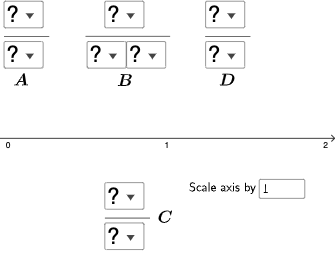
This example demonstrates comparing and identifying fractions on a number line. It involves core math concepts like fractions, percentages, ratios, addition, and coordinate geometry. Construction highlights the use of GeoGebra commands such as SelectedElement, IndexOf, Segment, Sequence, Textfield, OrthogonalLine, Intersect, Mode, If, Element. Suitable for middle school mathematics teaching or self-learning to understand the relationships and positions of fractions.
GeoGebra Commands & Parameters
SelectedElement(l1) → text5SelectedElement(l1) → text6SelectedElement(l1) → bSelectedElement(l1) → text7SelectedElement(l1) → text8SelectedElement(l5) → text9SelectedElement(l5) → text10IndexOf(SelectedElement[l1], l1) → cIndexOf(SelectedElement[l1], l1) → dSegment(B, C) → fSequence(CountIf[x ≟ i, l10], i, 1, 9, 1) → l11, {0, 0, 0, 0, 0, 0, 0, 0, 0}Textfield(a) → InputBox1OrthogonalLine(A, xAxis) → gOrthogonalLine(D, xAxis) → hIntersect(g, xAxis) → EIntersect(h, xAxis) → FSegment(A, E) → iSegment(D, F) → jMode(l10) → l12If(Length[l12] ≟ 0, "No digits repeat!", "You have repeated digits.") → text12Element(l12, 1) → e
AI Drawing Prompt Reference
Draw a number line and mark several fraction points, such as 1/2, 1/4, and 3/4. Connect these fraction points with line segments. Create a slider to adjust the positions of these fractions and observe their changes on the number line.
The prompt above was compiled from the original drawing commands and is for reference only.