
Clock Fractions-Percentage: Visualizing Common Fractions and Percentages on an A
Loading the math board and drawing, please wait…
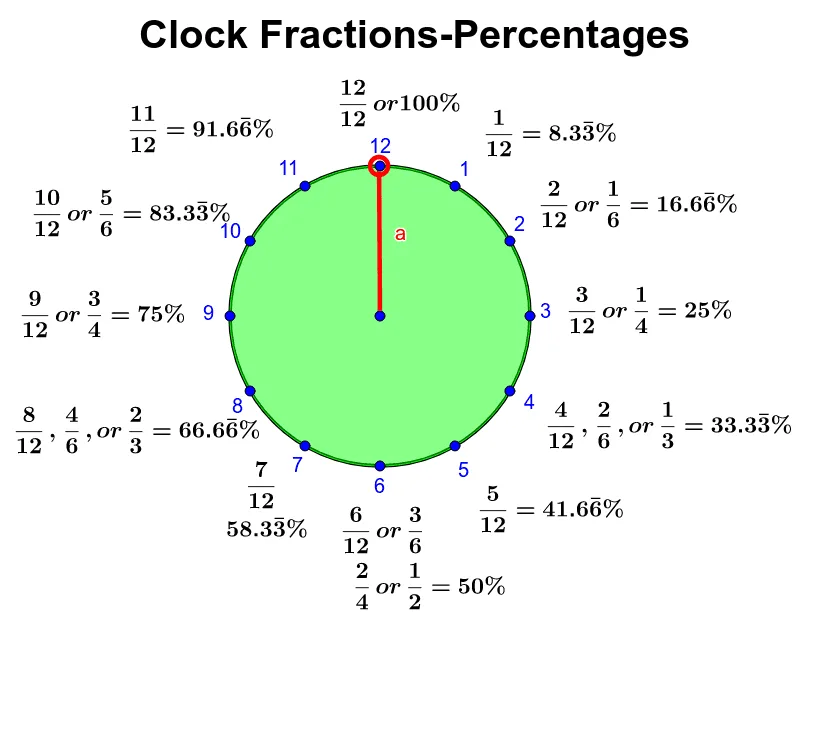
This GeoGebra example uses the face of an analog clock to visually demonstrate common everyday fractions and their percentage equivalents. By dividing the circular clock face into sectors using radii from the center to the 12 hour marks, learners can see how fractions like 1/2, 1/4, 1/3, and 1/6 correspond to specific angles (180°, 90°, 120°, 60°) and percentages (50%, 25%, 33.3%, 16.7%). The construction employs core GeoGebra commands: Circle to create the clock face, Point to mark the 12 hour positions, Segment to draw radii, CircleSector to highlight fractional parts, Angle to measure sector angles, and multiple text objects (text01 through text13) to label each fraction and percentage. This interactive visual is ideal for upper elementary and middle school students learning fraction-percentage conversions, angle measurement, and proportional reasoning, making abstract numerical relationships tangible through geometric representation.
GeoGebra Commands & Parameters
Circle((0, 0), 3) → cPoint(Circle[O, 3]) → MSegment(O, M) → aCircleSector(O, M, A) → dAngle(M, O, A) → α
AI Drawing Prompt Reference
Draw a circular clock face with 12 radii extending from the center to the 12 hour marks, highlight fractional sectors like 1/2, 1/4, 1/3, and 1/6 with colored arcs, and label each sector with its corresponding angle (180°, 90°, 120°, 60°) and percentage (50%, 25%, 33.3%, 16.7%).
The prompt above was compiled from the original drawing commands and is for reference only.