
Clock Fractions-Percentage by Auston B Cron
Loading the math board and drawing, please wait…
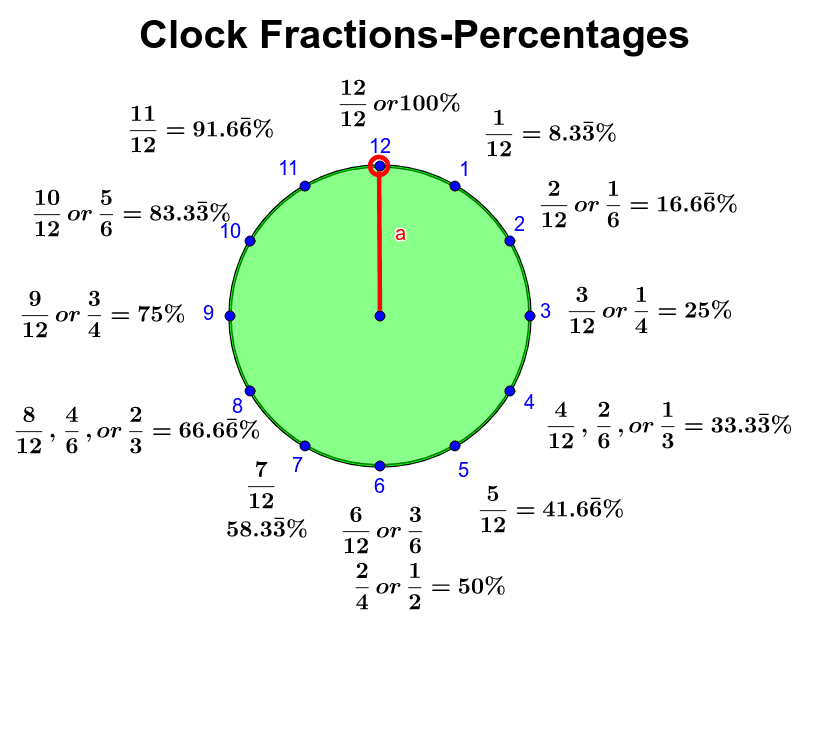
This GeoGebra example uses the face of an analog clock to visually map common fractions to their percentage equivalents, making it easy for learners to connect fractions, percentages, and angles. The core mathematical concepts include fraction meaning, fraction-to-percentage conversion, central angles in a circle, and symmetry in the clock layout. The construction is based on the summary: Circle creates the clock face, Point defines the center and tick marks, Segment draws hands or radial lines, CircleSector generates sectors representing fractional parts, and Angle labels the corresponding central angles. Objects include center O, tick points A through M, multiple sectors, and text labels text01 to text13 displaying fraction and percentage values, with title as the heading and α as the angle variable. This is suitable for upper elementary to middle school students learning fraction-percentage equivalence, and can be used in math activity classes or everyday time-and-proportion lessons to intuitively grasp common fractions like 1/2, 1/4, and 1/3 along with their percentages and angles.
GeoGebra Commands & Parameters
Circle((0, 0), 3) → cPoint(Circle[O, 3]) → MSegment(O, M) → aCircleSector(O, M, A) → dAngle(M, O, A) → α
AI Drawing Prompt Reference
Draw a circle with a radius of 3 as the clock face, then place a point M at the center O and draw a line segment from O to M. Next, draw a sector with O as the center, M as the start point, and A as the end point, representing 1/12 of the circle. Finally, label the central angle α and write the corresponding fraction and percentage labels on the sector, such as 1/12 and 8.33%.
The prompt above was compiled from the original drawing commands and is for reference only.