
Circle Tangent Secant Animation
Loading the math board and drawing, please wait…
In collections
Geometry Review
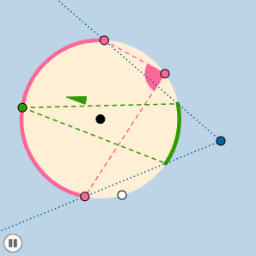
This example demonstrates the dynamic relationship between a circle, tangent, and secant lines through animation, highlighting concepts like continuity and parametric curves. Key GeoGebra commands used include Circle, Tangent, Intersect, Point, Angle, and Rotate. Suitable for high school students and math enthusiasts exploring geometry and calculus.
GeoGebra Commands & Parameters
Circle(A, B) → cDistance(A, B) → bPointIn(d) → CTangent(C, c) → a, eIntersect(c, a, 1) → DIntersect(c, e, 1) → EPoint(a) → FPoint(e) → GAngle(F, D, A) → αAngle(A, E, G) → βRay(C, D) → fRay(C, E) → gCircleArc(A, D, E) → hPoint(h) → HCircleArc(A, D, H) → kPoint(k) → IRay(C, I) → iRay(C, H) → jCircleArc(A, H, E) → pIntersect(c, j, 1) → JIntersect(c, i, 1) → KCircleArc(A, H, I) → qPoint(q) → LCircleArc(A, K, J) → rPoint(r) → MCircleArc(A, I, H) → sCircleArc(A, J, K) → tCircleArc(A, K, I) → c_1CircleArc(A, H, J) → d_1Segment(L, I) → lSegment(L, H) → mSegment(M, J) → nSegment(M, K) → a_1Segment(A, D) → b_1Segment(A, E) → e_1Circle(L, (0.25 * Distance[A, B])) → f_1Circle(M, (0.25 * Distance[A, B])) → g_1Intersect(l, i) → OIntersect(f_1, c, 1) → QIntersect(f_1, l, 1) → PIntersect(f_1, m, 1) → RIntersect(g_1, n, 1) → NIntersect(g_1, a_1, 1) → SCircleSector(M, N, S) → h_1CircleSector(L, P, R) → k_1Dilate(M, If[0 < o ≤ 1, 1 - o, 0], L) → M'Vector(M, M') → uTranslate(h_1, u) → p_1Translate(S, u) → S'Angle(R, L, S') → γRotate(p_1, If[1 < o ≤ 2, ((-(o - 1)) * γ), (-γ)], L) → q_1Translate(N, u) → N'Rotate(N', (-γ), L) → N''CircleSector(L, P, N'') → r_1Dilate(L, If[3 < o ≤ 4, 4 - o, 0], C) → L'Vector(L, L') → vTranslate(r_1, v) → s_1Translate(P, v) → P'Circle(C, (0.25 * Distance[A, B])) → t_1Intersect(t_1, i, 1) → TAngle(P', C, T) → δRotate(s_1, If[4 < o ≤ 5, ((o - 4) * δ), δ], C) → c_2
AI Drawing Prompt Reference
Create an animation showing the dynamic relationship between a circle, tangent, and secant lines. Display a line segment connecting two points on the circle, with tangents and secants drawn at these points that change dynamically. Include intersections, angles, rays, arcs, and sectors, then use these elements to construct new circles and sectors, highlighting complex geometric relationships and parametric curves.
The prompt above was compiled from the original drawing commands and is for reference only.