
Circle in a Square
Loading the math board and drawing, please wait…
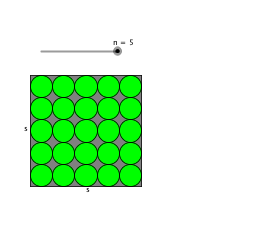
This example demonstrates the composite area of a circle within a square. Key mathematical concepts include circles, squares, and quadratic functions. It is constructed using GeoGebra commands such as Intersect, Circle, and Polygon. Suitable for high school mathematics education and learning.
GeoGebra Commands & Parameters
Intersect(xAxis, yAxis) → ACircle(A, 4) → cIntersect(c, xAxis, 2) → CPolygon(A, C, 4) → poly1, a, b, d, e, B, DCircle(A, f) → gIntersect(g, a, 1) → EIntersect(g, e, 1) → FCircle(E, A) → kIntersect(k, a, 2) → HCircle(F, A) → qIntersect(q, e, 2) → ICircle(I, F) → rIntersect(r, e, 2) → JCircle(H, E) → sIntersect(s, a, 2) → KIntersect(k, q, 2) → GCircle(G, E) → hCircle(J, I) → pCircle(K, H) → tIntersect(p, e, 2) → LIntersect(t, a, 2) → MCircle(L, J) → c_1Circle(M, K) → d_1Intersect(c_1, e, 2) → NIntersect(d_1, a, 2) → OCircle(N, L) → e_1Circle(O, M) → f_1OrthogonalLine(G, e) → iIntersect(t, i, 1) → PIntersect(t, i, 1) → QCircle(P, K) → g_1OrthogonalLine(E, i) → jIntersect(p, j, 1) → RCircle(R, J) → h_1Intersect(e_1, j, 1) → SCircle(S, N) → k_1Intersect(f_1, i, 1) → TOrthogonalLine(I, e) → lOrthogonalLine(H, a) → mIntersect(h_1, m, 1) → UIntersect(g_1, l, 1) → VCircle(T, O) → p_1Intersect(p_1, l, 1) → WIntersect(k_1, m, 1) → ZLine(P, V) → a_1Line(T, W) → b_1Line(R, U) → i_1Line(S, Z) → j_1OrthogonalLine(L, e) → l_1OrthogonalLine(M, a) → m_1Intersect(a_1, j_1) → A_1Intersect(a_1, i_1) → B_1Intersect(b_1, i_1) → C_1Intersect(j_1, b_1) → D_1Circle(A_1, Z) → q_1Intersect(m_1, j_1) → E_1Intersect(i_1, m_1) → F_1Circle(D_1, E_1) → r_1Circle(C_1, W) → s_1Circle(B_1, U) → t_1Intersect(e_1, e, 2) → G_1Intersect(f_1, a, 2) → H_1Circle(G_1, N) → c_2Circle(H_1, O) → d_2Intersect(c_2, e, 2) → I_1Intersect(d_2, a, 2) → J_1Circle(I_1, G_1) → e_2Circle(J_1, H_1) → f_2Intersect(f_2, i, 1) → K_1Intersect(e_2, j, 1) → L_1Circle(L_1, I_1) → g_2Circle(K_1, J_1) → h_2Line(I_1, L_1) → n_1Line(J_1, K_1) → a_2Intersect(k_1, c_2, 2) → M_1Intersect(j, i) → N_1Intersect(p_1, d_2) → O_1, P_1, ,Line(G_1, M_1) → b_2Line(H_1, P_1) → i_2Intersect(m, n_1) → Q_1Intersect(a_1, n_1) → R_1Intersect(m_1, n_1) → S_1Intersect(b_1, n_1) → T_1Intersect(n_1, i_2) → U_1Intersect(n_1, a_2) → V_1Intersect(a_2, b_2) → W_1Intersect(b_1, b_2) → Z_1Intersect(q_1, b_2, 1) → A_2Intersect(j_1, a_2) → B_2Intersect(l_1, a_2) → C_2Intersect(i_1, a_2) → D_2Intersect(l, a_2) → E_2Circle(R_1, Q_1) → k_2Circle(T_1, S_1) → p_2Circle(V_1, U_1) → q_2Circle(B_2, W_1) → r_2Circle(D_2, C_2) → s_2Intersect(e_2, e, 2) → F_2Intersect(f_2, a, 2) → G_2Circle(F_2, I_1) → t_2Circle(G_2, J_1) → c_3Intersect(t_2, e, 2) → H_2Intersect(c_3, a, 2) → I_2OrthogonalLine(H_2, e) → j_2OrthogonalLine(F_2, e) → l_2OrthogonalLine(I_2, a) → m_2OrthogonalLine(G_2, a) → n_2Intersect(a_1, l_2) → J_2Intersect(b_1, l_2) → K_2Intersect(a_2, l_2) → L_2Intersect(n_1, n_2) → M_2Intersect(j_1, n_2) → N_2Intersect(i_1, n_2) → O_2Intersect(h_2, c_3, 2) → P_2Intersect(j, j_2) → Q_2Intersect(a_1, j_2) → R_2Intersect(b_1, j_2) → S_2Intersect(a_2, j_2) → T_2Intersect(j_2, m_2) → U_2Intersect(i, m_2) → V_2Intersect(i_1, m_2) → W_2Intersect(j_1, m_2) → Z_2Intersect(n_1, m_2) → A_3Circle(Q_2, H_2) → d_3Circle(R_2, J_2) → e_3Circle(S_2, K_2) → f_3Circle(T_2, L_2) → g_3Intersect(j_2, n_2) → B_3Circle(U_2, B_3) → h_3Circle(A_3, M_2) → k_3Circle(Z_2, N_2) → p_3Circle(W_2, O_2) → q_3Circle(V_2, P_2) → r_3Circle(Q_2, H_2) → s_3Circle(R_2, J_2) → t_3Circle(S_2, K_2) → c_4Circle(T_2, L_2) → d_4Circle(U_2, B_3) → e_4Circle(A_3, M_2) → f_4Circle(V_1, W_1) → g_4Circle(T_1, U_1) → h_4Circle(R_1, S_1) → k_4Circle(L_1, Q_1) → p_4Circle(S, M_1) → q_4Circle(A_1, A_2) → r_4Circle(D_1, Z_1) → s_4Circle(B_2, N_2) → t_4Circle(Z_2, N_2) → c_5Circle(W_2, O_2) → d_5Circle(V_2, P_2) → e_5Circle(K_1, E_2) → f_5Circle(D_2, C_2) → g_5Circle(C_1, F_1) → h_5Circle(T, P_1) → k_5Circle(P, V) → p_5Circle(B_1, F_1) → q_5Circle(R, U) → r_5Circle(G, E) → s_5
AI Drawing Prompt Reference
Draw a square with a circle inscribed inside, touching all four sides. Construct a quadrilateral inside the square using the intersections of the circle with the axes. Then, draw a larger circle centered at the square's center, and add several smaller circles centered at the intersections of this circle with the axes. Finally, connect some key points with lines to create a more intricate and decorative pattern.
The prompt above was compiled from the original drawing commands and is for reference only.