
Circle Area Animation (Parallelogram)
Loading the math board and drawing, please wait…
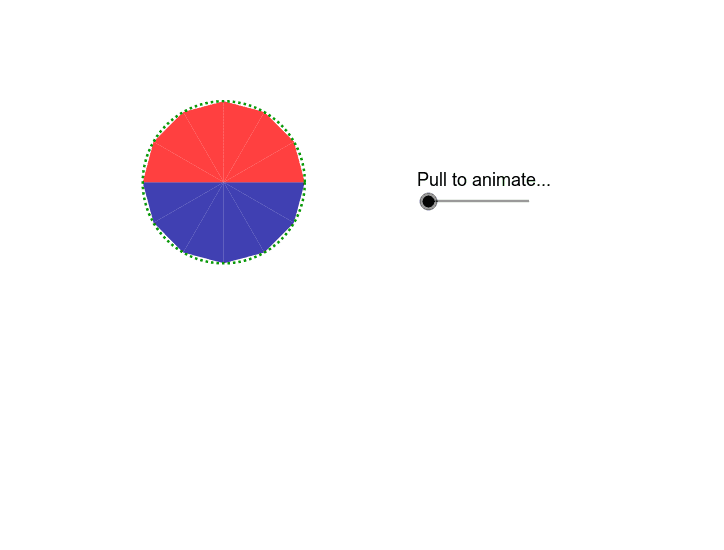
This example demonstrates how the area of a circle is approximated by a parallelogram through animation. Key math concepts include circle area formula, limit concept, and parallelogram properties. Construction involves GeoGebra commands like Circle, Point, Vector, Translate, Rotate, Line, Angle, Mirror, Polygon, OrthogonalLine, and Segment. Suitable for high school mathematics education to illustrate the derivation of the circle area formula.
GeoGebra Commands & Parameters
Circle(A, a) → cPoint(c) → BVector(B, A) → uTranslate(C, Vector[(-u)]) → C'_2Rotate(C'_2, ((g / 100 * 15))°, C'_2) → C''_2Line(B, A) → bRotate(B, 30*°, A) → B'Angle(B, A, B') → αLine(B', A) → dCircle(C, a) → eVector(A, B') → vVector(B, B') → wTranslate(C, v) → C'_1Rotate(C'_2, 60*°, C) → C''_1Rotate(C'_1, 60*°, C) → DLine(C'_2, C) → fMirror(C'_1, f) → EMirror(C''_1, f) → C'''Mirror(D, f) → D'Polygon(E, C'_2, C) → poly1, c_1, e_1, c'Rotate(E, ((g / 100 * 15))°, C'_2) → E'_1Rotate(C, ((g / 100 * 15))°, C'_2) → C'_3Polygon(E'_1, C''_2, C'_3) → poly1', c'_1, e', c''Polygon(C''', E, C) → poly2, c_2, c''', e_2Rotate(C''', (g / 100 * β), F) → GRotate(E, (g / 100 * β), F) → E'Rotate(C, (g / 100 * β), F) → C'_4Polygon(G, E', C'_4) → poly2', c'_2, g_1, e'_1Polygon(C, D', C''') → poly3, c'''_1, c_3, d'Rotate(C, (g / 100 * γ), H) → C'Rotate(D', (g / 100 * γ), H) → D''Rotate(C''', (g / 100 * γ), H) → IPolygon(C', D'', I) → poly3', i, c'_3, d''Mirror(C', f) → C''_3Mirror(D'', f) → D'''_1Mirror(I, f) → I'_1Polygon(C''_3, D'''_1, I'_1) → poly3''_1, i', c''_1, d'''Mirror(G, f) → G'_1Mirror(E', f) → E''_1Mirror(C'_4, f) → JPolygon(G'_1, E''_1, J) → poly2''_1, j, g', e''Mirror(E'_1, f) → KMirror(C''_2, f) → LMirror(C'_3, f) → MPolygon(K, L, M) → poly1''_1, m, k, lOrthogonalLine(C, f) → hMirror(C', h) → C''Mirror(D'', h) → D'''Mirror(I, h) → I'Polygon(C'', D''', I') → poly3'', i'_1, c''_2, d'''_1Mirror(G, h) → G'Mirror(E', h) → E''Mirror(C'_4, h) → NPolygon(G', E'', N) → poly2'', n, g'_1, e''_1Mirror(E'_1, h) → OMirror(C''_2, h) → PMirror(C'_3, h) → QPolygon(O, P, Q) → poly1'', q, o, pMirror(K, h) → K'Mirror(L, h) → L'Mirror(M, h) → M'Polygon(K', L', M') → poly4, m', k', l'Mirror(G'_1, h) → RMirror(E''_1, h) → SMirror(J, h) → J'Polygon(R, S, J') → poly5, j', r, sMirror(C''_3, h) → TMirror(D'''_1, h) → UMirror(I'_1, h) → VPolygon(T, U, V) → poly6, v_1, t, u_1Vector((0, 0), (-3.27, 2.09)) → offsetvectorPoint(c) → WRotate(W, 30*°, A) → W'Angle(W, A, W') → δVector(W', W) → zVector(W', A) → w_1Polygon(TestPoint, E_1, D_1, J_1, TestB, Z, F_1, A_1, G_1, B_1, H_1, C_1, I_1) → poly7, testpoint, i_1, d_1, j_1, testb, e_3, z_1, f_1, a_1, g_2, b_1, h_1, c_4Translate(TestPoint, Vector[((g - 100) / 100 * w_1)]) → TestPoint'_1Translate(E_1, Vector[((g - 100) / 100 * w_1)]) → K_1Translate(Z, Vector[((g - 100) / 100 * w_1)]) → Z'_1Translate(F_1, Vector[((g - 100) / 100 * w_1)]) → L_1Translate(A_1, Vector[((g - 100) / 100 * w_1)]) → M_1Translate(G_1, Vector[((g - 100) / 100 * w_1)]) → N_1Translate(B_1, Vector[((g - 100) / 100 * w_1)]) → O_1Translate(H_1, Vector[((g - 100) / 100 * w_1)]) → P_1Translate(C_1, Vector[((g - 100) / 100 * w_1)]) → Q_1Translate(I_1, Vector[((g - 100) / 100 * w_1)]) → R_1Translate(D_1, Vector[((g - 100) / 100 * w_1)]) → S_1Translate(J_1, Vector[((g - 100) / 100 * w_1)]) → T_1Translate(TestB, Vector[((g - 100) / 100 * w_1)]) → TestB'_1Polygon(TestPoint'_1, K_1, S_1, T_1, TestB'_1, Z'_1, L_1, M_1, N_1, O_1, P_1, Q_1, R_1) → poly7'_1, testpoint', r_1, s_1, t_1, testb', k_1, z', l_1, m_1, n_1, o_1, p_1, q_1Mirror(TestPoint, h) → TestPoint'Mirror(E_1, h) → U_1Mirror(Z, h) → Z'Mirror(F_1, h) → V_1Mirror(A_1, h) → W_1Mirror(G_1, h) → Z_1Mirror(B_1, h) → A_2Mirror(H_1, h) → B_2Mirror(C_1, h) → C_2Mirror(I_1, h) → D_2Mirror(D_1, h) → E_2Mirror(J_1, h) → F_2Mirror(TestB, h) → TestB'Polygon(TestPoint', U_1, E_2, F_2, TestB', Z', V_1, W_1, Z_1, A_2, B_2, C_2, D_2) → poly7', testpoint'_1, d_2, e_4, f_2, testb'_1, u_2, z'_1, v_2, w_2, z_2, a_2, b_2, c_5Segment(G_2, H_2) → h_2Segment(I_2, J_2) → i_2
AI Drawing Prompt Reference
Create an animation showing how the area of a circle is approximated by a parallelogram. Start by drawing a circle and then draw a line segment from the center to the circumference. Construct a parallelogram using this segment as one of its sides. Rotate one side of the parallelogram to make it gradually approximate the circle's area. The animation should clearly show the changes in the parallelogram's shape and area, illustrating the derivation of the circle area formula.
The prompt above was compiled from the original drawing commands and is for reference only.