
Circle and Perimeter
Loading the math board and drawing, please wait…
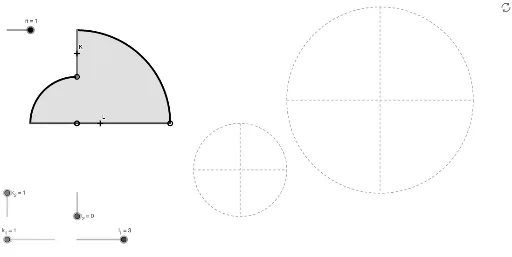
This example demonstrates how to use GeoGebra to draw circles, sectors, arcs, and calculate circumference and area. Core math concepts include circle equations, circumference formulas, linear equations, correlation, and geometric transformations. Construction highlights involve commands/objects like Circle, CircleSector, Point, Rotate, Angle, CircleArc, Ray, OrthogonalLine, Intersect, Segment. Suitable for high school students and teachers learning geometry construction and circle-related knowledge.
GeoGebra Commands & Parameters
CircleSector(A, B, C) → cCircleSector(D, E, F) → dCircle(G, 4) → ePoint(e) → HRotate(H, 90°, G) → H'Angle(H, G, H') → αCircleArc(G, H, H') → fCircle(I, 2) → gPoint(g) → JRotate(J, 90°, I) → J'Angle(J, I, J') → βCircleArc(I, J, J') → hCircle(M, 4) → kPoint(k) → NRay(N, M) → iOrthogonalLine(M, i) → jIntersect(k, i, 2) → OIntersect(k, j, 2) → PIntersect(k, j, 1) → QSegment(N, O) → lSegment(P, Q) → mSegment((x(K) - k_1, y(K)), (x(K) + k_1, y(K))) → aSegment((x(K), y(K) - k_1), (x(K), y(K) + k_1)) → qSegment((x(L), y(L) - l_1), (x(L), y(L) + l_1)) → bSegment((x(L) - l_1, y(L)), (x(L) + l_1, y(L))) → pCircle(R, 2) → rPoint(r) → SRay(S, R) → sOrthogonalLine(R, s) → tIntersect(r, s, 2) → TIntersect(r, t, 2) → UIntersect(r, t, 1) → VSegment(S, T) → a_1Segment(U, V) → b_1