
Circle and Coordinate Geometry: Equations and Construction
Loading the math board and drawing, please wait…
In collections
Coordinate Geometry
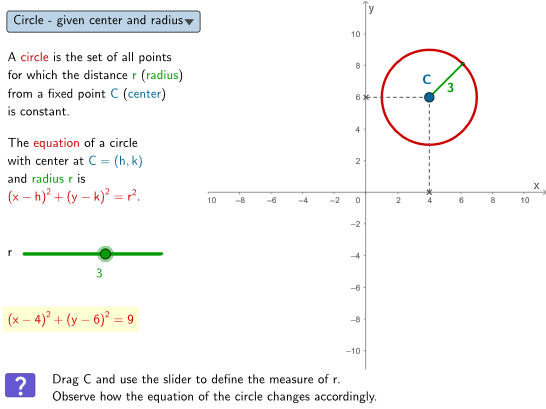
This example demonstrates how to draw circles using coordinate geometry and understand their equations. Key mathematical concepts include the standard equation of a circle, the relationship between center and radius, and geometric construction techniques. Construction involves using GeoGebra commands like PointIn, Circle, Center to create circles and verify points. Suitable for middle school students or high school students learning about circle properties and coordinate geometry applications.
GeoGebra Commands & Parameters
PointIn(peep) → CCircle(C, r) → cPoint(c) → ASegment(C, A) → aSegment(C, B) → fSegment(C, D) → gCenter(k) → ESegment(E, G) → jSegment(E, F) → lPoint(k) → HSegment(E, H) → mSelectedIndex(ddMenu) → isCorner(5) → dims
AI Drawing Prompt Reference
Draw a circle with center C and radius r. First, select a point C on the plane as the center, then draw a circle c with C as the center and r as the radius. Next, choose a point A on circle c and draw a line segment CA from C to A. Then, choose two more points B and D on circle c, and draw line segments CB and CD from C to B and C to D, respectively. Finally, find the center E of circle c and draw two line segments from E to two points G and F on circle c, and another line segment from E to another point H.
The prompt above was compiled from the original drawing commands and is for reference only.