
Centroid of a Square
Loading the math board and drawing, please wait…
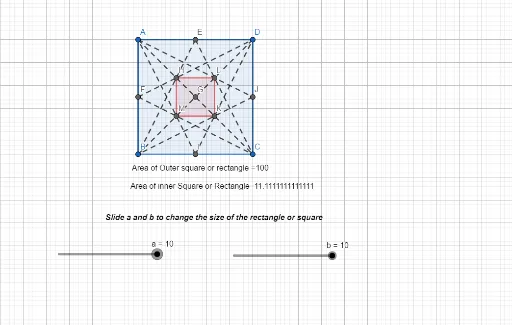
This example demonstrates the centroid of a square. Key mathematical concepts include the definition and calculation of the centroid in geometry. Using GeoGebra commands such as Point, Segment, Polygon, and Centroid, the process of calculating the centroid is visually illustrated. Suitable for students at the junior high school level and above to learn geometric construction and related concepts.
GeoGebra Commands & Parameters
Point(Circle[A, a]) → BSegment(A, B) → f_2Point(Circle[A, b]) → DSegment(A, D) → g_2Point(Circle[D, a]) → CSegment(D, C) → h_2Polygon(A, B, C, D) → q4, i_2, j_2, k_2, l_2Segment(A, C) → m_2Centroid(q4) → GMidpoint(j_2) → IMidpoint(h_2) → JMidpoint(g_2) → EMidpoint(f_2) → FSegment(B, G) → n_2Segment(I, A) → p_2Segment(A, J) → q_2Segment(D, G) → r_2Segment(E, C) → s_2Segment(F, C) → t_2Segment(E, B) → c_2Segment(F, D) → d_2Intersect(n_2, p_2) → MIntersect(q_2, r_2) → LIntersect(m_2, c_2) → HSegment(I, D) → e_2Segment(J, B) → f_3Intersect(m_2, e_2) → KPolygon(H, M, K, L) → q5, g_3, v_1, h_3, w_1Area(q4) → o_2Area(q5) → u_2
AI Drawing Prompt Reference
Draw a square ABCD, then find and mark its centroid G. Next, draw the diagonals AC and BD, and the midpoints of each side, forming a new quadrilateral HMLK. Finally, calculate and mark the areas of square ABCD and quadrilateral HMLK.
The prompt above was compiled from the original drawing commands and is for reference only.