
Cyclic Quadrilateral by adrian Swenson
Loading the math board and drawing, please wait…
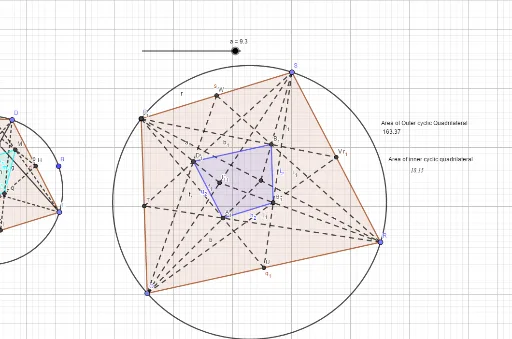
This example demonstrates the geometric properties and construction of a cyclic quadrilateral. It involves core math concepts like circles, polygons, angle relationships, and the property of opposite angles being supplementary. The construction uses GeoGebra commands such as Circle, Point, Polygon, Segment, Midpoint, Intersect, Area, and Text. It is suitable for high school mathematics education to understand the properties and construction techniques of cyclic quadrilaterals.
GeoGebra Commands & Parameters
Circle(A, B) → cPoint(c) → CPoint(c) → DPoint(c) → EPoint(c) → FPolygon(C, D, E, F) → q1, c_1, d, e, fSegment(C, E) → gSegment(F, D) → hMidpoint(C, D) → GMidpoint(D, E) → HMidpoint(E, F) → IMidpoint(F, C) → JSegment(F, H) → iSegment(F, G) → jSegment(C, I) → kSegment(C, H) → lSegment(D, J) → mSegment(D, I) → nSegment(E, G) → pSegment(E, J) → qIntersect(j, m) → KIntersect(i, n) → LIntersect(l, p) → MIntersect(k, q) → NPolygon(K, M, L, N) → q2, k_1, m_1, l_1, n_1Circle(O, a) → rPoint(r) → PPoint(r) → QPoint(r) → RPoint(r) → SPolygon(P, Q, R, S) → q3, p_1, q_1, r_1, sSegment(P, R) → tMidpoint(p_1) → TMidpoint(q_1) → UMidpoint(r_1) → VMidpoint(s) → WMidpoint(t) → ZSegment(Q, Z) → bSegment(U, P) → f_1Segment(P, V) → g_1Segment(Z, S) → h_1Segment(W, R) → i_1Segment(R, T) → j_1Intersect(b, f_1) → A_1Intersect(g_1, h_1) → B_1Segment(S, Q) → s_1Midpoint(s_1) → C_1Segment(Q, W) → t_1Segment(C_1, P) → a_1Segment(T, S) → b_1Segment(Q, V) → d_1Segment(R, C_1) → e_1Segment(S, U) → f_2Intersect(t_1, a_1) → D_1Intersect(d_1, e_1) → E_1Intersect(e_1, d_1) → F_1Intersect(d_1, f_2) → G_1Intersect(f_2, e_1) → H_1Intersect(e_1, a_1) → I_1Intersect(a_1, g_1) → J_1Polygon(D_1, A_1, E_1, B_1) → q4, g_2, h_2, i_2, j_2Area(q4) → oText(o) → text1Area(q3) → u
AI Drawing Prompt Reference
Draw a circle and place four random points on its circumference to form a quadrilateral. Connect these points to create the quadrilateral. Then, draw two diagonals inside the quadrilateral and find the midpoint of each side. Connect the midpoints of adjacent sides to form a smaller quadrilateral. Finally, draw an inscribed quadrilateral within the original one using the same circle and label all key points and segments.
The prompt above was compiled from the original drawing commands and is for reference only.