
Centroid Investigation
Loading the math board and drawing, please wait…
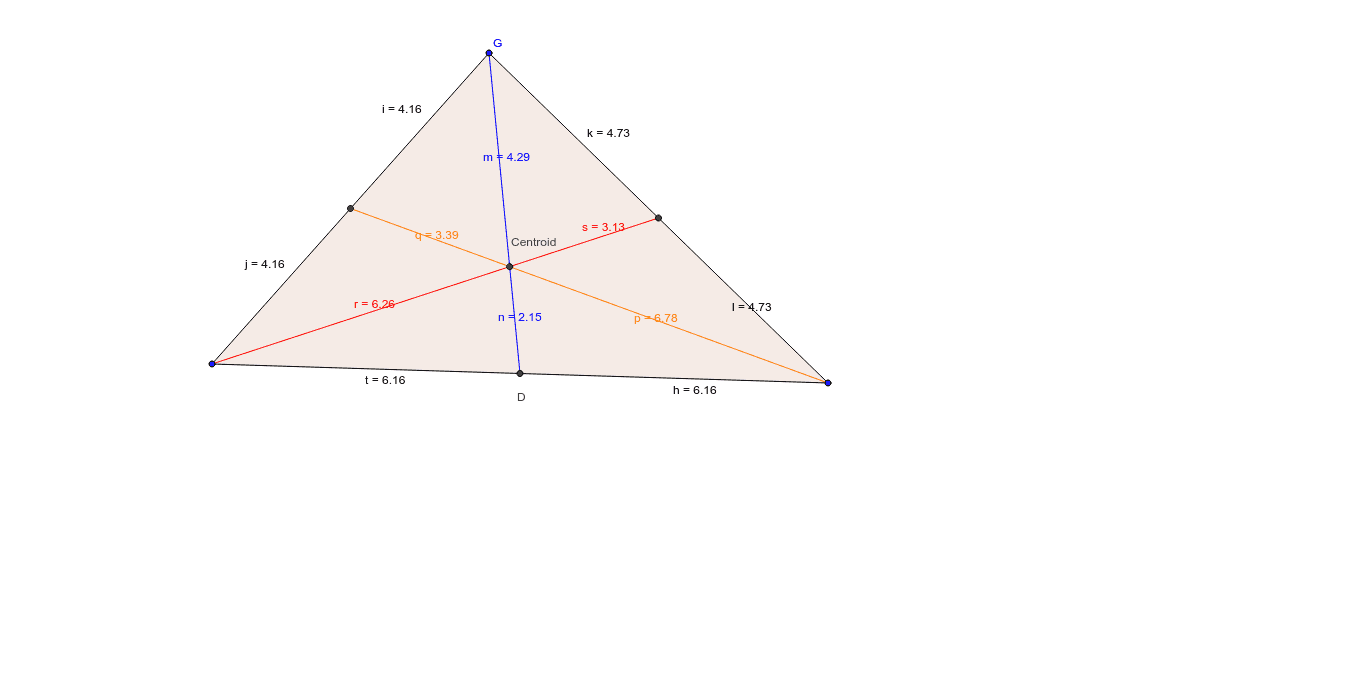
This example demonstrates the calculation and properties of the centroid of a polygon. It involves core mathematical concepts such as centroid, midpoint, segment, geometric transformations, arithmetic mean, and solid geometry. The construction uses GeoGebra commands like Polygon, Midpoint, Segment, and Intersect to build the shape and calculate the centroid. Suitable for high school students and math enthusiasts to understand the application of centroids in geometry.
GeoGebra Commands & Parameters
Polygon(A, G, C) → poly1, c, a, bMidpoint(c) → D_1Midpoint(a) → EMidpoint(b) → DSegment(G, D) → dSegment(C, D_1) → eSegment(E, A) → fIntersect(d, e) → CentroidSegment(A, D) → tSegment(D, C) → hSegment(G, D_1) → iSegment(D_1, A) → jSegment(G, E) → kSegment(E, C) → lSegment(G, Centroid) → mSegment(Centroid, D) → nSegment(C, Centroid) → pSegment(Centroid, D_1) → qSegment(A, Centroid) → rSegment(Centroid, E) → s
AI Drawing Prompt Reference
Draw a triangle ABC and find its centroid. First, connect the midpoints of each side to form new segments. Then, connect the centroid to each vertex and observe the relationships between these segments.
The prompt above was compiled from the original drawing commands and is for reference only.