
Curvature of an Ellipse
Loading the math board and drawing, please wait…
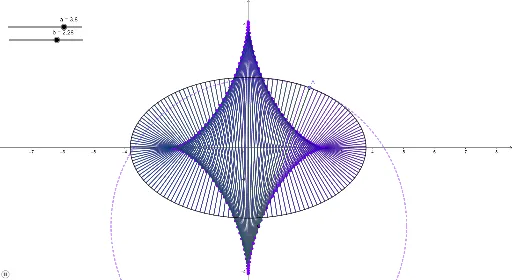
This example demonstrates the curvature of an ellipse. Key mathematical concepts include the geometric properties of ellipses and the calculation of curvature. Using GeoGebra commands such as CurveCartesian, Point, and Curvature, the example visually illustrates the curvature changes at different points on the ellipse. Suitable for high school mathematics education and learning.
GeoGebra Commands & Parameters
CurveCartesian((a * sin(t)), (b * cos(t)), t, (-2 * π), (2 * π)) → cPoint(c) → ACurvature(A, c) → kTangent(A, c) → fOrthogonalLine(A, f) → gPoint(Circle[A, k]) → BPoint(Circle[A, r]) → CSegment(A, C) → h_1Circle(A, C) → dIntersect(d, g, 1) → DCircle(D, A) → eLine(A, D) → i_1Segment(D, A) → j_1
AI Drawing Prompt Reference
Draw an ellipse using the parametric equation (a * sin(t), b * cos(t)) for t from -2π to 2π. Select a point A on the ellipse, calculate its curvature k, draw the tangent line f at A and the perpendicular line g to f. Draw a circle with center A and radius k, find the intersection D of this circle with g, then draw a circle with center A and D, and draw line segments j1 from D to A and i1 from A to D.
The prompt above was compiled from the original drawing commands and is for reference only.