
Central and Inscribed Angles by GeoGebra Team
Loading the math board and drawing, please wait…
In collections
Learn Geometry
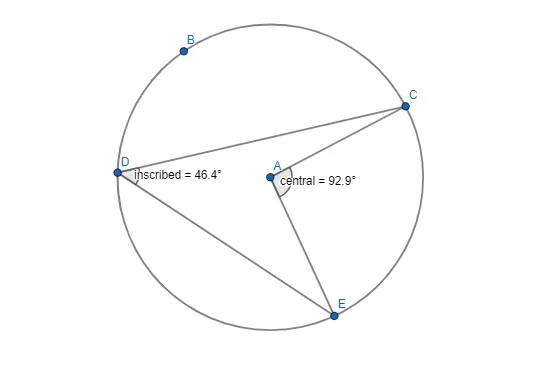
This example demonstrates how to construct central and inscribed angles using GeoGebra. It involves core mathematical concepts like circles, angles, and geometric construction. Key GeoGebra commands used include Circle, Point, Segment, and Angle. Suitable for middle school students and above learning about circle geometry or for educational demonstrations.
GeoGebra Commands & Parameters
Circle(A, B) → cPoint(c) → CPoint(c) → DPoint(c) → ESegment(C, D) → fSegment(D, E) → gSegment(E, A) → hSegment(A, C) → iAngle(E, A, C) → centralAngle(E, D, C) → inscribed
AI Drawing Prompt Reference
Draw a circle with a center point and a point on the circumference to set the radius. Place three distinct points on the circle. Connect two of these points to form a chord. Then connect the third point to the center and to one endpoint of the chord, creating two segments. Next, draw segments from the center to both endpoints of the chord to form a central angle, and from the third point on the circle to both endpoints of the chord to form an inscribed angle. The final figure shows a circle with a chord, two radii, and two angles sharing the same chord: one vertex at the center, the other on the circumference.
The prompt above was compiled from the original drawing commands and is for reference only.