
Centered Pentagonal Numbers II: Geometric Sequence Visualization
Loading the math board and drawing, please wait…
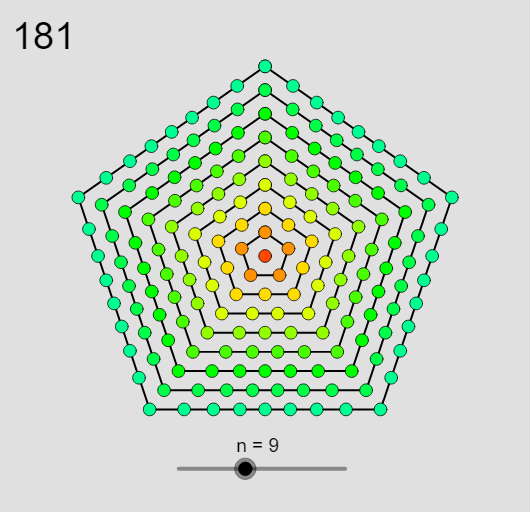
This example demonstrates how centered pentagonal numbers are formed by repeatedly expanding concentric, center-based pentagonal layers, creating a visual sequence that can also be compared with frequency-style distributions. The key mathematics includes centered polygonal numbers (the centered version of pentagonal numbers), sequence generation (recursive/explicit relationships), and discrete data visualization such as histogram-like rectangular bars and frequency distribution. Construction highlights from the GeoGebra command structure: Sequence is used to generate the sequence terms, while Zip bundles elements into drawable data sets; Element selects specific indexed terms/objects for the current layer; Text adds numerical annotations. Mod can control periodic behaviors or grouping of indices during the animation. Functions/parameters such as f, cx, cy set the mapping from values to geometry and define the center coordinates; N, LN, pVp, L_1, L_2, and n determine the layer count, ranges, and scaling. The size variable scales graphical primitives. Numerous point/object arrays (A1–A21, B1–B6) provide vertices and auxiliary points for building each centered pentagon layer. Suitable for upper-secondary and early undergraduate lessons on number patterns, geometric sequences, and interactive exploration in GeoGebra.
GeoGebra Commands & Parameters
Sequence(0, N) → LNZip(((5 * (k + 1)^(2)) - (5 * (k + 1)) + 2) / 2 - ((5 * k^(2)) - (5 * k) + 2) / 2, k, LN) → pVpZip(CurveCartesian[cx(k, θ), cy(k, θ), θ, 0, (2 * π)], k, LN) → L_1Zip(Sequence[C(k), k, 0, (2 * π), (2 * π / Element[pVp, val])], C, L_1, val, LN + 1) → L_2Element(L_1, 1) → B1Element(L_1, 2) → B2Element(L_1, 3) → B3Element(L_1, 4) → B4Element(L_1, 5) → B5Element(L_1, 6) → B6Element(L_1, 7) → B7Element(L_1, 8) → B8Element(L_1, 9) → B9Element(L_1, 10) → B10Element(L_1, 11) → B11Element(L_1, 12) → B12Element(L_1, 13) → B13Element(L_1, 14) → B14Element(L_1, 15) → B15Element(L_1, 16) → B16Element(L_1, 17) → B17Element(L_1, 18) → B18Element(L_1, 19) → B19Element(L_1, 20) → B20Element(L_1, 21) → B21Element(L_2, 1) → C1Element(L_2, 2) → C2Element(L_2, 3) → C3Element(L_2, 4) → C4Element(L_2, 5) → C5Element(L_2, 6) → C6Element(L_2, 7) → C7Element(L_2, 8) → C8Element(L_2, 9) → C9Element(L_2, 10) → C10Element(L_2, 11) → C11Element(L_2, 12) → C12Element(L_2, 13) → C13Element(L_2, 14) → C14Element(L_2, 15) → C15Element(L_2, 16) → C16Element(L_2, 17) → C17Element(L_2, 18) → C18Element(L_2, 19) → C19Element(L_2, 20) → C20Element(L_2, 21) → C21Zip(((5 * k^(2)) + (5 * k) + 2) / 2, k, LN) → pVText(Element[pV, n]) → text1
AI Drawing Prompt Reference
Draw a set of concentric regular pentagons expanding outward from a common center. Each layer has five vertices evenly spaced on a circle, with the radius increasing according to a specific sequence. Show 21 layers, each with a thin outline and small numeric labels at the vertices indicating the layer index or the difference in pentagonal numbers. The overall shape is symmetric, with a clear center, and colors may gradually change per layer to emphasize the geometric progression.
The prompt above was compiled from the original drawing commands and is for reference only.