
Carpet Area and Geometric Construction
Loading the math board and drawing, please wait…
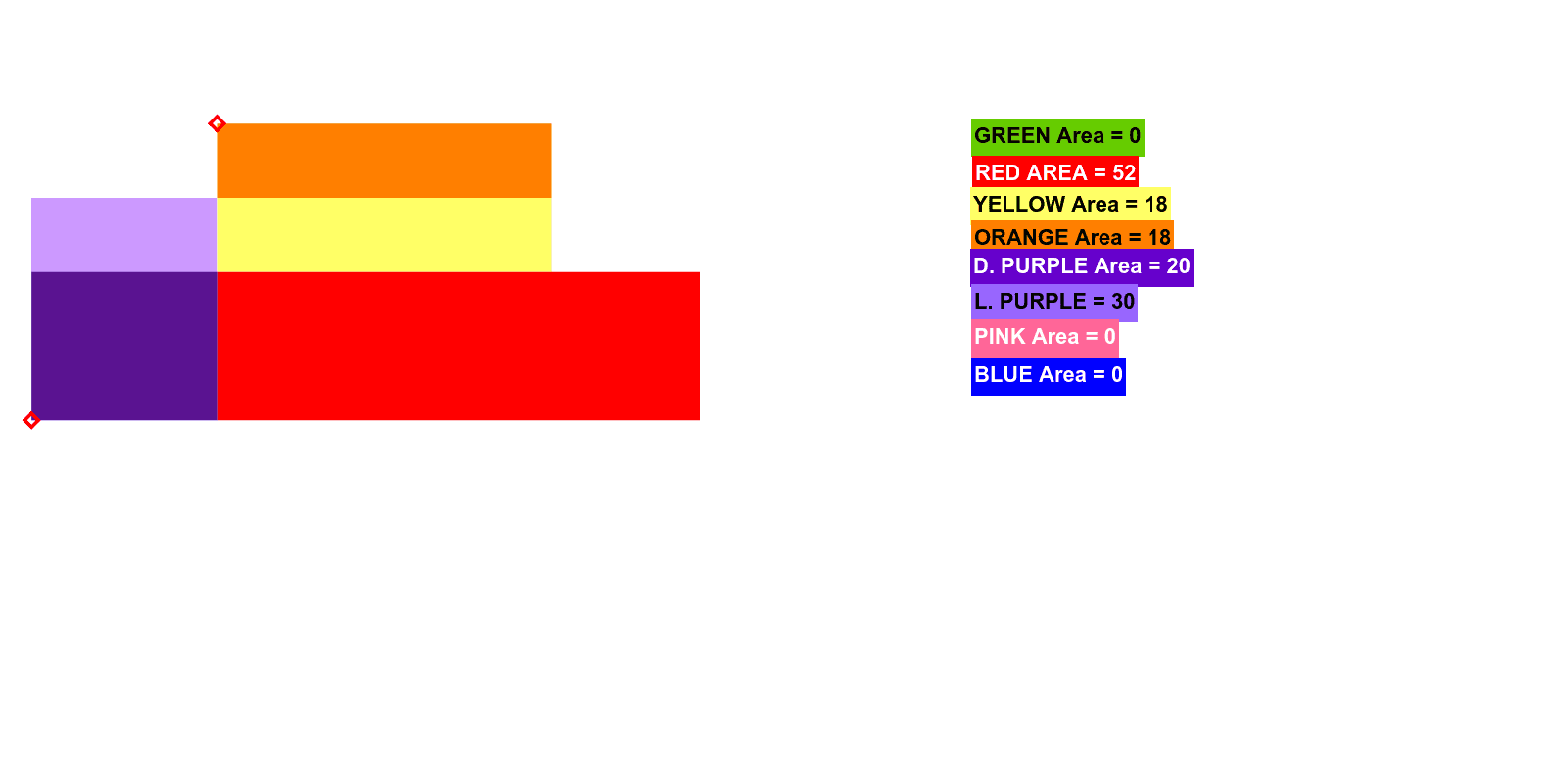
This example demonstrates how to calculate carpet area through geometric construction. Key mathematical concepts include area calculation, geometric construction, and properties of equilateral triangles. Construction involves GeoGebra commands such as Segment, Polygon, PointIn, etc. Suitable for middle or high school mathematics learning to understand the relationship between geometry and area.
GeoGebra Commands & Parameters
Segment(A, B) → aSegment(A, C) → bSegment(C, D) → cSegment(D, E) → dSegment(E, F) → eSegment(F, G) → fSegment(G, H) → gSegment(H, B) → hPolygon(A, B, H, G, F, E, D, C) → poly1, a_1, b_1, h_1, g_1, f_1, e_1, d_1, c_1PointIn(poly1) → Pointpoly1_1PointIn(poly1) → Pointpoly1_2Point(a) → ISegment(I, J) → iOrthogonalLine(J, i) → jIntersect(j, b) → KOrthogonalLine(I, i) → kLine(L, a) → lIntersect(l, h) → MIntersect(h, b_1) → NPoint(h) → OPointIn(poly1) → PPoint(poly1) → QPoint(c) → RSegment(R, O) → qPoint(q) → SOrthogonalLine(O, h) → sOrthogonalLine(I, a) → tIntersect(a, h) → VPoint(a) → UPoint(d) → WOrthogonalLine(W, d) → nOrthogonalLine(U, a) → i_1Intersect(n, i_1) → ZIntersect(d, e) → A_1OrthogonalLine(A_1, d) → j_1Intersect(i_1, j_1) → B_1Intersect(j_1, e) → C_1Intersect(j_1, e) → D_1Intersect(j_1, e) → E_1Intersect(j_1, e) → F_1Intersect(j_1, e) → G_1Intersect(j_1, e) → H_1Intersect(f, g_1) → I_1Intersect(j_1, e) → J_1Intersect(f, g_1) → K_1Intersect(j_1, e) → L_1Intersect(g, h) → M_1Intersect(j_1, h) → N_1Point(i_1) → O_1OrthogonalLine(O_1, i_1) → k_1Intersect(k_1, h) → P_1Polygon(U, V, P_1, O_1) → poly2, u, v, p_1, o_1Polygon(O_1, P_1, N_1, B_1) → poly3, o_2, p_2, n_1, b_2Intersect(n, i_1) → Q_1Point(c) → R_1Polygon(R_1, O_1, Q_1, W) → poly4, r_1, o_3, q_1, wIntersect(n, h) → S_1Intersect(a, b) → T_1Intersect(k_1, b) → U_1Polygon(T_1, U, O_1, U_1) → poly5, t_1, u_1, o_4, u_2OrthogonalLine(U_1, c) → l_1Intersect(j_1, l_1) → V_1Point(e) → W_1OrthogonalLine(W_1, e) → m_1Intersect(n, m_1) → Z_1Intersect(n, l_1) → A_2Polygon(W, A_2, V_1, A_1) → poly6, w_1, a_2, v_1, a_3Intersect(j_1, l_1) → B_2Polygon(A_2, Z_1, W_1, B_2) → poly7, a_4, z_1, w_2, b_3Intersect(i_1, j_1) → C_2Intersect(n, i_1) → D_2Point(f) → E_2OrthogonalLine(E_2, g) → s_1OrthogonalLine(M_1, g) → c_2OrthogonalLine(W, d) → d_2Intersect(c_2, d_2) → F_2Intersect(s_1, d_2) → G_2Polygon(G_2, F_2, M_1, E_2) → poly8, g_2, f_2, m_2, e_2Intersect(e, f) → H_2OrthogonalLine(H_2, e) → h_2Intersect(h_2, a) → I_2Intersect(h_2, o_4) → J_2OrthogonalLine(U, a) → i_2OrthogonalLine(J_2, h_2) → j_2Intersect(j_2, i_2) → K_2Polygon(I_2, U, K_2, J_2) → poly9, i_3, u_3, k_2, j_3OrthogonalLine(H_2, h_2) → l_2Intersect(l_2, i_2) → L_2OrthogonalLine(W, d) → n_2OrthogonalLine(H_2, l_2) → r_2OrthogonalLine(L_2, l_2) → s_2Intersect(n_2, r_2) → O_2PointIn(poly1) → Pointpoly1_3PointIn(poly2) → Pointpoly2_1PointIn(poly1) → Pointpoly1PointIn(poly2) → Pointpoly2
AI Drawing Prompt Reference
Draw a geometric figure consisting of line segments and points. The figure includes a square and a triangle connected by line segments. Key points are ensuring the intersection of line segments and maintaining symmetry. The construction order starts with drawing line segments, then adding points, and finally connecting these points to form the figure.
The prompt above was compiled from the original drawing commands and is for reference only.