
Car drive through polygon exterior angles
Loading the math board and drawing, please wait…
In collections
Introduction to Angles
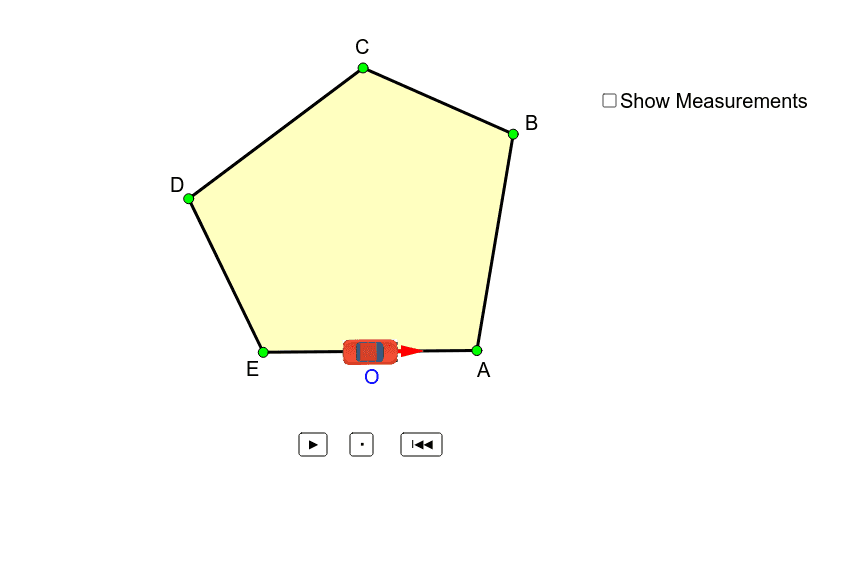
This example demonstrates a car driving along the path formed by the exterior angles of a polygon. It involves core math concepts like polygons, exterior angles, vectors, rotation, and geometric transformations. GeoGebra commands and objects used include Rotate, Polygon, Vector, etc. Suitable for high school mathematics teaching to visually understand properties of polygon exterior angles and vector applications.
GeoGebra Commands & Parameters
Rotate((x(P1) + (x(A) - x(E)) / Distance[E, A], y(P1) + (y(A) - y(E)) / Distance[E, A]), Min[Max[t - 1, 0], 1] * (180° - Angle[B, A, E]), P1) → P1'Rotate((x(P2) + (x(B) - x(A)) / Distance[A, B], y(P2) + (y(B) - y(A)) / Distance[A, B]), Min[Max[t - 3, 0], 1] * (180° - Angle[C, B, A]), P2) → P2'Rotate((x(P3) + (x(C) - x(B)) / Distance[B, C], y(P3) + (y(C) - y(B)) / Distance[B, C]), Min[Max[t - 5, 0], 1] * (180° - Angle[D, C, B]), P3) → P3'Rotate((x(P4) + (x(D) - x(C)) / Distance[C, D], y(P4) + (y(D) - y(C)) / Distance[C, D]), Min[Max[t - 7, 0], 1] * (180° - Angle[E, D, C]), P4) → P4'Rotate((x(P5) + (x(E) - x(D)) / Distance[E, D], y(P5) + (y(E) - y(D)) / Distance[E, D]), Min[Max[t - 9, 0], 1] * (180° - Angle[A, E, D]), P5) → P5'Polygon(E, A, B, C, D) → poly1, a_1, b_1, c_1, d_1, e_1If(t ≤ 2, P1, If[t ≤ 4, P2, If[t ≤ 6, P3, If[t ≤ 8, P4, If[t ≤ 10, P5, P6]]]]) → PIf(t ≤ 2, P1', If[t ≤ 4, P2', If[t ≤ 6, P3', If[t ≤ 8, P4', If[t ≤ 10, P5', P6']]]]) → P'Vector(P, P') → uAngle(P1', P1, (x(P1) + (x(A) - x(E)) / Distance[E, A], y(P1) + (y(A) - y(E)) / Distance[E, A])) → αAngle(P2', P2, (x(P2) + (x(B) - x(A)) / Distance[A, B], y(P2) + (y(B) - y(A)) / Distance[A, B])) → βAngle(P3', P3, (x(P3) + (x(C) - x(B)) / Distance[B, C], y(P3) + (y(C) - y(B)) / Distance[B, C])) → γAngle(P4', P4, (x(P4) + (x(D) - x(C)) / Distance[C, D], y(P4) + (y(D) - y(C)) / Distance[C, D])) → δAngle(P5', P5, (x(P5) + (x(E) - x(D)) / Distance[E, D], y(P5) + (y(E) - y(D)) / Distance[E, D])) → εOrthogonalLine(P, u) → fPoint(f) → FMidpoint(F, P') → GVector(G, P) → vTranslate(P, v) → P'_1Translate(P', v) → P''Segment(A, (x(A) + (x(A) - x(E)) / Distance[E, A], y(A) + (y(A) - y(E)) / Distance[E, A])) → gSegment(B, (x(B) + (x(B) - x(A)) / Distance[A, B], y(B) + (y(B) - y(A)) / Distance[A, B])) → hSegment(C, (x(C) + (x(C) - x(B)) / Distance[B, C], y(C) + (y(C) - y(B)) / Distance[B, C])) → iSegment(D, (x(D) + (x(D) - x(C)) / Distance[C, D], y(D) + (y(D) - y(C)) / Distance[C, D])) → jSegment(E, (x(E) + (x(E) - x(D)) / Distance[D, E], y(E) + (y(E) - y(D)) / Distance[D, E])) → kMidpoint(a_1) → OAngle((x(A) + (x(A) - x(E)) / Distance[E, A], y(A) + (y(A) - y(E)) / Distance[E, A]), A, B) → aAngle((x(B) + (x(B) - x(A)) / Distance[A, B], y(B) + (y(B) - y(A)) / Distance[A, B]), B, C) → bAngle((x(C) + (x(C) - x(B)) / Distance[B, C], y(C) + (y(C) - y(B)) / Distance[B, C]), C, D) → cAngle((x(D) + (x(D) - x(C)) / Distance[C, D], y(D) + (y(D) - y(C)) / Distance[C, D]), D, E) → dAngle((x(E) + (x(E) - x(D)) / Distance[D, E], y(E) + (y(E) - y(D)) / Distance[D, E]), E, A) → eIf((t ≥ 1) ∧ (t < 2), α, If[t ≥ 2, a, 0*°]) → α'If((t ≥ 3) ∧ (t < 4), β, If[t ≥ 4, b, 0*°]) → β'If((t ≥ 5) ∧ (t < 6), γ, If[t ≥ 6, c, 0*°]) → γ'If((t ≥ 7) ∧ (t < 8), δ, If[t ≥ 7, d, 0*°]) → δ'If((t ≥ 9) ∧ (t < 10), ε, If[t ≥ 9, e, 0*°]) → ε'
AI Drawing Prompt Reference
Draw a polygon and demonstrate a car driving along the path formed by the exterior angles. Start by constructing the polygon, then create rotated points at each exterior angle. Draw the car's path using these points, calculate vectors and exterior angles for each segment, draw normals, find midpoints and new path points, and combine all elements to show how the car drives along the exterior angle path.
The prompt above was compiled from the original drawing commands and is for reference only.