
Can Random Cuts Form a Triangle?
Loading the math board and drawing, please wait…
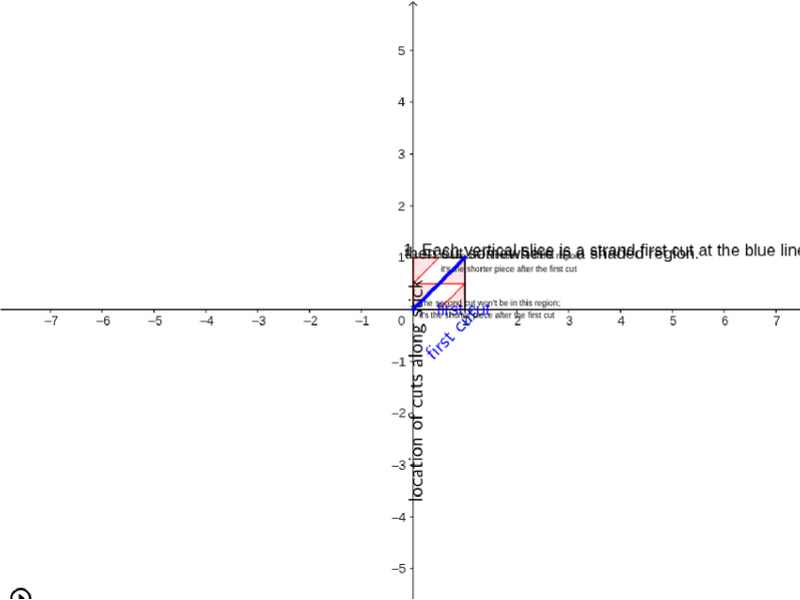
This example demonstrates how to form a triangle by randomly cutting a piece of spaghetti. Key math concepts include geometric construction and probability & statistics. It uses commands like If, Corner, Polygon, Segment, RotateText. Suitable for middle school and above students to learn geometric construction and probability & statistics.
GeoGebra Commands & Parameters
If(t < 4, 0.5 - ((x - 0.5) * Min[1, Max[0, t - 2]]), ((1 - ((1 - x) * Min[1, Max[0, 5 - t]])) * (1 - x) / x)) → hCorner(1, 5) → APolygon((0, 0), (1, 0), 4) → poly1Segment((0, 0), (1, 1)) → aRotateText("location of cuts along stick", 90°) → text1RotateText("first cut", 45°) → text3IntegralBetween(m, h, 0.5, 1) → RightGreenRotateText("probability of triangle", 90°) → text5If(t < 4, 0.5 + (x * (1 + Min[1, Max[0, t - 2]])) - (0.5 * Min[1, Max[0, t - 2]]), ((1 - (x * Min[1, Max[0, 5 - t]])) * x / (1 - x)) + (x * Min[1, Max[0, 5 - t]])) → gIntegralBetween(f, g, 0, 0.5) → LeftGreen
AI Drawing Prompt Reference
Draw a line segment from left to right with a length of 1. Randomly select two points on the line to cut it into three parts. Calculate and display the probability that these three parts can form a triangle. Draw a green area to represent the probability of forming a triangle.
The prompt above was compiled from the original drawing commands and is for reference only.