
Calculating Gradient Between Two Points on a Line
Loading the math board and drawing, please wait…
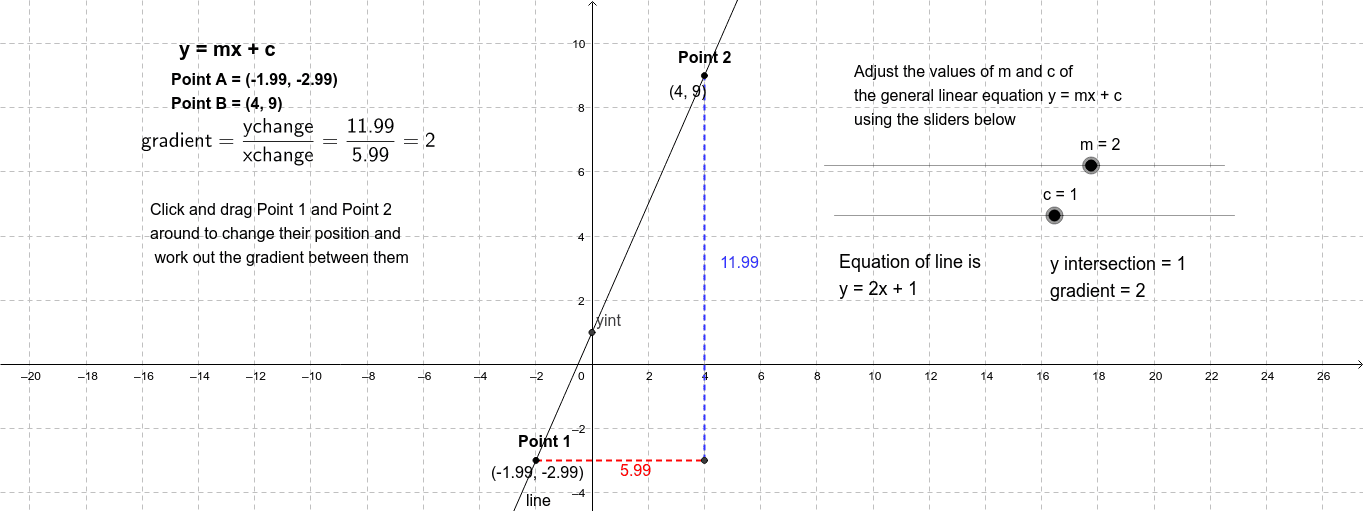
This example demonstrates how to calculate the gradient between two points on a straight line, helping students understand the connection between gradient and the coefficient m in the line equation, as well as the fundamental properties of gradient. By constructing two points A and B and using GeoGebra commands like Intersect, Point, and Segment, the calculation process and geometric meaning of the gradient can be visually presented. This example is suitable for secondary school mathematics teaching, covering topics in analytical geometry and linear equations.
GeoGebra Commands & Parameters
Intersect(line, yAxis) → yintIntersect(line, xAxis) → xintPoint(line) → APoint(line) → BIntersect(b, a) → CSegment(A, C) → dSegment(C, B) → e
AI Drawing Prompt Reference
Draw a straight line intersecting both the x-axis and y-axis at right angles. Select two arbitrary points on the line. Connect the point where the line intersects the x-axis to one of the points on the line, and then connect this intersection point to the other point. Display the line segments and intersection points to illustrate the calculation method of the line's slope and its relationship with the coefficient m in the line equation.
The prompt above was compiled from the original drawing commands and is for reference only.