
Calculating Areas of Parallelograms and Trapezoids
Loading the math board and drawing, please wait…
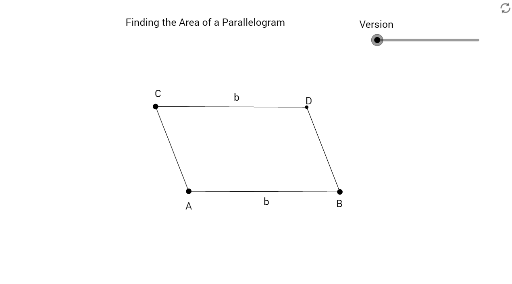
This example demonstrates how to dynamically calculate the areas of parallelograms and trapezoids using GeoGebra. It involves core mathematical concepts such as base length, height, and area formulas for polygons. Key construction steps utilize commands and objects like Segment, Line, Intersect, OrthogonalLine, Point, Circle, Polygon, Midpoint, and Rotate. Suitable for middle school and above mathematics education, providing an intuitive understanding of area calculation methods.
GeoGebra Commands & Parameters
Segment(A, B) → fSegment(A, C) → gLine(C, f) → h_2Line(B, g) → iIntersect(h_2, i) → DSegment(C, D) → jSegment(D, B) → kOrthogonalLine(B, f) → lOrthogonalLine(C, h_2) → mLine(A, B) → nIntersect(m, n) → EIntersect(h_2, l) → FIntersect(h_2, l) → GSegment(B, G) → pSegment(G, D) → qIntersect(m, n) → HSegment(H, C) → rSegment(H, A) → sOrthogonalLine(A, f) → tIntersect(t, j) → ISegment(I, C) → aPoint(f) → JOrthogonalLine(J, f) → bIntersect(b, h_2) → KIntersect(h_2, t) → LCircle(K, a) → dIntersect(d, h_2, 1) → MPolygon(M, K, J) → poly2, j_1, m_1, k_1Segment(D, L) → eSegment(L, C) → f_1Segment(A, L) → cSegment(A, D) → g_1Segment(A, L) → h_3Polygon(A, D, C) → poly1, c_1, a_1, d_1Polygon(A, D, B) → poly3, b_1, a_2, d_2OrthogonalLine(D, f) → h_1Intersect(h_1, f) → NSegment(N, D) → i_1Point(e) → OSegment(O, D) → l_1Segment(A, O) → n_1Polygon(A, D, O) → poly4, o, a_3, d_3Midpoint(k) → PPolygon(B, A, O, D) → poly5, b_2, a_4, o_1, d_4Rotate(B, (-α), P) → B'Rotate(A, (-α), P) → A'Rotate(O, (-α), P) → O'Rotate(D, (-α), P) → D'Polygon(B', A', O', D') → poly5', b', a', o', d'
AI Drawing Prompt Reference
Draw a parallelogram and a trapezoid to demonstrate how to dynamically calculate their areas using the base and height. Start by constructing the parallelogram with two parallel sides and a non-parallel side, then find the midpoint of the parallel sides and draw perpendicular lines to determine the height of the trapezoid. Next, form the shapes of both the parallelogram and the trapezoid using their vertices, labeling the base, height, and area. Finally, rotate a part of the parallelogram to create a new shape and compare the area relationships between the two figures.
The prompt above was compiled from the original drawing commands and is for reference only.