
Using a Protractor to Measure an Angle
Loading the math board and drawing, please wait…
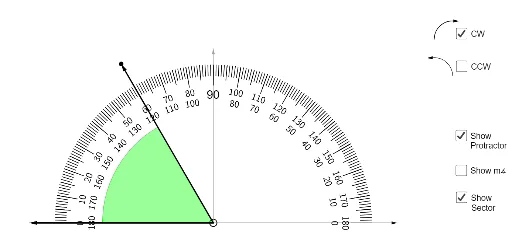
① This example demonstrates how to use a protractor (semicircular tool) to measure an angle, providing an interactive visualization of the angle reading process. ② The core mathematical concept is angle measurement, involving the vertex, sides, and numerical value of the angle, while also implicitly relating angles to arcs and sectors. ③ Construction highlights: Based on the construction summary, GeoGebra commands such as Point, Vector, Sequence, RotateText, Text, Circle, Semicircle, CircleSector, CircleArc, and Angle are used to create the protractor's semicircular scale, angle markers, and dynamic text displays. ④ Suitable for upper elementary or middle school students learning introductory geometry, and also useful for teachers in classroom demonstrations to help students intuitively understand protractor usage and angle concepts.
GeoGebra Commands & Parameters
Point(xAxis) → APoint(xAxis) → BVector(A, B) → uVector(B, A) → vSequence(Segment[((4 * cos(t)), (4 * sin(t))), ((4.3 * cos(t)), (4.3 * sin(t)))], t, 0°, 180°, 1°) → l1Sequence(Segment[((3.9 * cos(t)), (3.9 * sin(t))), ((4.3 * cos(t)), (4.3 * sin(t)))], t, 0°, 180°, 5°) → l2RotateText("0", 90°) → text1RotateText("10", (-(80°))) → text2RotateText("20", (-(70°))) → text3RotateText("30", (-(60°))) → text4RotateText("40", (-(50°))) → text5RotateText("50", (-(40°))) → text6RotateText("60", (-(30°))) → text7RotateText("70", (-(20°))) → text8RotateText("80", (-(10°))) → text9Text(90) → text10Circle((0, 0), 0.1) → cRotateText("100", 10°) → text11RotateText("110", 20°) → text12RotateText("120", 30°) → text13RotateText("130", 40°) → text14RotateText("170", 78°) → text20RotateText("160", 68°) → text17RotateText("150", 57°) → text16RotateText("140", 47°) → text15RotateText("180", 90°) → text18Circle((0, 0), 3.5) → dCircle((0, 0), 3.2) → eRotateText("0", 90°) → text19RotateText("10", 80°) → text21RotateText("20", 70°) → text22RotateText("30", 60°) → text23RotateText("40", 50°) → text24RotateText("50", 40°) → text25RotateText("60", 30°) → text26RotateText("70", 20°) → text27RotateText("80", 10°) → text28RotateText("100", (-(10°))) → text29RotateText("110", (-(20°))) → text30RotateText("130", (-(41°))) → text32RotateText("120", (-(31°))) → text31RotateText("140", (-(49°))) → text33RotateText("150", (-(58°))) → text34RotateText("160", (-(68°))) → text35RotateText("170", (-(78°))) → text36RotateText("180", (-(90°))) → text37Sequence(Segment[((3.75 * cos(t)), (3.75 * sin(t))), ((4.3 * cos(t)), (4.3 * sin(t)))], t, 0°, 180°, 10°) → l3Semicircle((-5, 0), (5, 0)) → fPoint(f) → FVector((0, 0), (0, 4.75)) → wPoint(w) → GVector(G, F) → aCircle(C, 3) → gPoint(a) → ICircleSector(C, I, H) → hPoint(g) → JCircleSector(C, J, I) → kCircleArc(K, M, L) → pPoint(p) → OVector(O, P) → bCircleArc(S, Q, R) → qVector(R, T) → jVector(C, B) → mVector(C, A) → nAngle(B, C, F) → α