
Calculating Area of Parallelogram
Loading the math board and drawing, please wait…
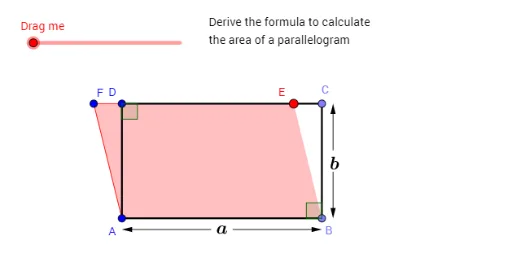
This example demonstrates how to calculate the area of a parallelogram using vector cross product and coordinate geometry. Key concepts include vectors, geometric constructions, and midpoint calculations. It utilizes commands like Line, Point, Vector, Midpoint, and Segment. Suitable for high school mathematics education and student exploration of geometric principles.
GeoGebra Commands & Parameters
Line(A, yAxis) → bLine(A, xAxis) → aPoint(a) → BDistance(A, B) → ABLine(B, b) → cPoint(c) → CLine(C, a) → dPoint(d) → GIntersect(b, d) → DIf(NearC ≟ true, C, G) → PmDynamicCoordinates(G, x(Pm), y(Pm)) → ELine(E, c) → gIntersect(a, g) → HCircle(E, AB) → eIntersect(e, d, 1) → FLine(F, b) → hIntersect(a, h) → IDistance(C, E) → ECDistance(E, H) → EHIf(E_B ≟ true, Polygon[E, B, H], Polygon[E, B, C]) → poly1Polygon(I, B, C, F) → poly2, i, b_2, c_2, fIf(E_B ≟ true, Polygon[F, A, D], Polygon[F, A, I]) → poly3Polygon(A, H, E, D) → poly4, a_1, h_1, e_1, d_1Polygon(A, B, C, D) → poly5, a_2, b_1, c_1, d_2Vector(C, D) → uIf(E_R ≟ true, Translate[poly1, Vector[(m * u)]], Translate[poly3, Vector[(m * (-u))]]) → TransMidpoint(D, A) → JLine(J, a) → jCircle(J, n) → kIntersect(k, j, 1) → KLine(K, h) → lCircle(K, n) → pIntersect(p, l, 2) → LIntersect(p, l, 1) → MIntersect(d, l) → NIntersect(a, l) → OVector(M, O) → vVector(L, N) → wMidpoint(A, B) → PCircle(P, n) → qLine(P, c) → rIntersect(q, r, 1) → QLine(Q, j) → sCircle(Q, n) → tIntersect(t, s, 1) → RIntersect(t, s, 2) → SIntersect(c, s) → TIntersect(b, s) → UVector(R, U) → u_1Vector(S, T) → v_1Intersect(j, c) → VCircle(V, n) → f_1Intersect(f_1, c) → W, ZSegment(D, C) → k_1Segment(C, B) → l_1Segment(B, A) → m_1Intersect(f_1, j, 2) → A_1Line(A_1, r) → g_1Circle(A_1, n) → p_1Intersect(p_1, g_1, 2) → B_1Intersect(p_1, g_1, 1) → C_1Intersect(d, g_1) → D_1Intersect(a, g_1) → E_1Vector(B_1, D_1) → w_1Vector(C_1, E_1) → i_1Segment(A, D) → j_1Angle(A, D, C) → αAngle(C, B, A) → β
AI Drawing Prompt Reference
Draw a parallelogram with its area calculation aids. Start with two perpendicular axes, place a point on the horizontal axis as one vertex, draw a line through it parallel to the vertical axis, pick another point on that line as the next vertex, then draw a line through it parallel to the horizontal axis, intersecting the vertical axis to complete the parallelogram. Construct several auxiliary triangles and quadrilaterals, use translations and rotations to show area relationships, and add diagonal vectors, midpoints, circles, and intersection points. Color different polygonal regions distinctly to illustrate the area formula visually.
The prompt above was compiled from the original drawing commands and is for reference only.