
Building Square Cross Sections
Loading the math board and drawing, please wait…
In collections
My 3D Collection
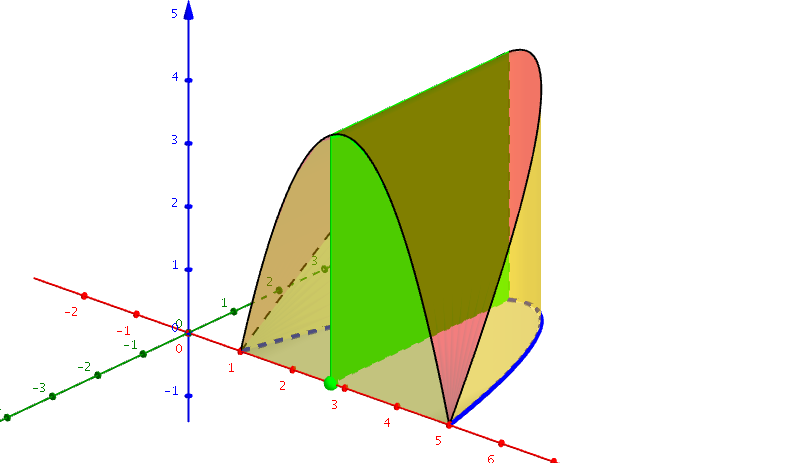
This example demonstrates constructing square cross sections perpendicular to the region between a function f(x) and the x-axis in the xy-plane. It involves core mathematical concepts such as functions, planes, piecewise functions, tangent lines, complex numbers, median value, and division. The construction uses GeoGebra commands like Function, Point, Polygon, CurveCartesian, and Surface, with objects including f, A, poly1, a, b, c, d, e, g, h, i, j, k. It is suitable for high school and above students to understand the relationship between function graphs and geometric cross-sections, and the application of dynamic geometry software in mathematics education.
GeoGebra Commands & Parameters
Function(((-(x - 1)) * (x - 5)), 1, 5) → fPoint(Segment[(1, 0), (5, 0)]) → APolygon(A, (x(A), f(x(A)), 0), (x(A), f(x(A)), f(x(A))), (x(A), 0, f(x(A)))) → poly1, a, b, c, dCurveCartesian(t, f(t), f(t), t, 1, 5) → eCurveCartesian(t, 0, f(t), t, 1, 5) → gSurface(t, (u * 0) + ((1 - u) * f(t)), f(t), t, 1, 5, u, 0, 1) → hSurface(t, f(t), ((1 - u) * f(t)), t, 1, 5, u, 0, 1) → iSurface(t, 0, ((1 - u) * f(t)), t, 1, 5, u, 0, 1) → jSurface(t, ((1 - u) * f(t)), 0, t, 1, 5, u, 0, 1) → k
AI Drawing Prompt Reference
Draw a function graph in the xy-plane defined from x=1 to x=5, showing the region between the graph and the x-axis. Construct a square cross-section perpendicular to the x-axis within this region, and use dynamic geometry software to visualize the changing process of the cross-section. Represent the relationship between the cross-section and the function graph using multiple surfaces, ultimately presenting the function, the cross-section, and their dynamic interaction.
The prompt above was compiled from the original drawing commands and is for reference only.