
Building Kites with GeoGebra
Loading the math board and drawing, please wait…
In collections
Open Middle: Building Special Quadrilaterals
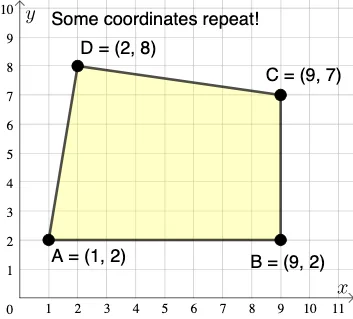
This example demonstrates how to construct a kite using GeoGebra. Key mathematical concepts include coordinate geometry, geometric construction, and optimization. Users can dynamically adjust the kite's shape and size using commands like PointIn, Polygon, and Segment. Suitable for middle school and above students or teachers for teaching and learning.
GeoGebra Commands & Parameters
PointIn(e) → APointIn(e) → BPointIn(e) → CPointIn(e) → DPolygon(A, B, C, D) → q1, a_1, b_1, c_1, d_1Segment(A, B) → fSegment(B, C) → gSegment(C, D) → hSegment(D, A) → iMode(l1) → l2If(Length[l2] ≟ 0, "No repeated coordinates.", "Some coordinates repeat!") → text1
AI Drawing Prompt Reference
Draw a kite by connecting four points to form a quadrilateral where opposite sides are parallel and of different lengths, demonstrating coordinate geometry and geometric construction. First mark four points, then connect adjacent points to form four sides, and finally check for repeated coordinate points and annotate the result.
The prompt above was compiled from the original drawing commands and is for reference only.