
Building Exponential Growth & Decay Function Models
Loading the math board and drawing, please wait…
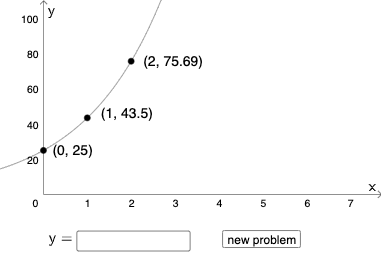
① This GeoGebra example demonstrates how to interactively construct exponential growth and decay function models, allowing users to input parameters and observe the resulting function graphs. ② Core mathematical concepts include exponential functions, exponential growth and decay, logarithmic functions and their relationships, and the basics of mathematical modeling. ③ Construction highlights: from the construction summary, commands such as Random, RandomElement, If, and Textfield are used to generate random parameters and provide input interfaces; objects include parameters a, b, A, n, a button (button1), functions f, c, g, h, and auxiliary shapes like equilateral triangles, tree diagrams, and cuboids, but the main focus is on dynamically displaying exponential models. ④ Suitable for high school or introductory college algebra and function courses, as well as for mathematical modeling activities, helping students intuitively understand the properties of exponential functions and the impact of parameters on graphs.
GeoGebra Commands & Parameters
Random(0, 100) → aRandomElement(Sequence[i, i, 0.1, 0.9, 0.01]) → bRandom(1, 2) → nIf(n ≟ 1, (1, (a * b)), (1, (a * (b + 1)))) → BIf(n ≟ 1, (2, (a * b^(2))), (2, (a * (b + 1)^(2)))) → CIf(n ≟ 1, (3, (a * b^(3))), (3, (a * (b + 1)^(3)))) → DIf(n ≟ 2, g, f) → hTextfield(p) → InputBox1If(p(0) ≟ h(0), "Initial amount is correct.", "Initial amount is not correct.") → text4If(n ≟ 1, b, c) → dIf(p(1) / p(0) ≟ p(2) / p(1) ≟ p(3) / p(2) ≟ d, "Base is correct.", "Base is not correct.") → text5
AI Drawing Prompt Reference
Draw an exponential growth and decay function model with parameters a, b, and n. First, generate a random number between 0 and 100 as a, then generate a random number between 0.1 and 0.9 with a step of 0.01 as b. Finally, randomly choose 1 or 2 as n to dynamically display different function graphs, including f, g, and h. Also, provide an input box for users to enter initial values and check if they are correct.
The prompt above was compiled from the original drawing commands and is for reference only.