
Build Your Own Right Triangular Prism by Tim Brzezinski
Loading the math board and drawing, please wait…
In collections
GeoGebra 3D & AR: Geometry Resources & Challenges
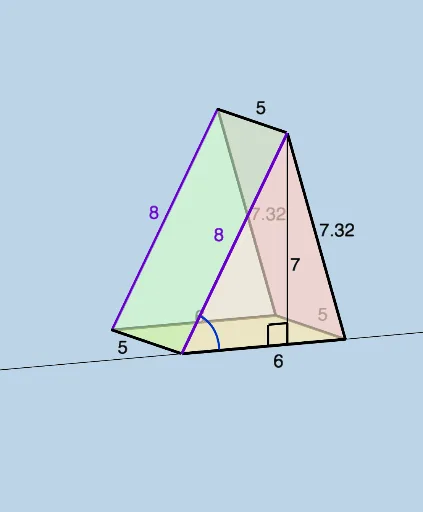
This example demonstrates how to construct a right triangular prism using GeoGebra. It involves core mathematical concepts such as polygons, solid geometry, linear equations, and angles. Key GeoGebra commands and objects used include Line, Sphere, Segment, Intersect, Polygon, Circle, OrthogonalLine, Angle, and Textfield. Suitable for high school students learning solid geometry, it can be used for teaching demonstrations and geometric construction practice.
GeoGebra Commands & Parameters
Line((0, 0, triangleheight), (1, 0, triangleheight)) → fSphere(A, oneside) → aSegment(B, A) → jIntersect(f, a) → C, DPolygon(A, C, B) → t1, b_1, a_1, cPolygon(A, D, B) → t2, b_2, a_2, dSegment(A, C) → gSegment(C, B) → iLine(A, (0, 1, 0)) → kLine(B, (b, 1, 0)) → lSphere(B, prismheight) → mSphere(A, prismheight) → eIntersect(k, e) → E, FIntersect(l, m) → G, HLine((x(C), y(C) + 1, z(C)), C) → nSphere(C, prismheight) → oIntersect(n, o) → I, JPolygon(H, F, I) → t3, i_1, h_1, f_1Segment(H, F) → pSegment(F, I) → qSegment(I, H) → rLine((x(D), y(D) + 1, z(D)), D) → tSphere(D, prismheight) → uIntersect(t, u) → K, LPolygon(A, F, I, C) → q1, a_3, f_2, i_2, c_1Polygon(I, H, B, C) → q2, i_3, h_2, b_3, c_2Polygon(A, B, H, F) → q3, a_4, b_4, h_3, f_3Segment(C, I) → g_1Segment(B, H) → j_1Segment(A, F) → k_1Polygon(A, B, D) → t4, d_2, a_5, b_5Polygon(F, H, K) → t5, k_2, f_4, h_4Polygon(A, F, K, D) → q4, a_6, f_5, k_3, d_3Polygon(D, K, H, B) → q5, d_4, k_4, h_5, b_6Segment(A, D) → l_1Segment(D, B) → m_1Segment(D, K) → n_1Segment(K, F) → p_1Segment(K, H) → q_1Circle(((0.3 * j), 0, 0), ((-0.3 * j), 0, 0), (0, 0, (0.3 * j))) → r_1Line(A, B) → s_1OrthogonalLine(C, s_1, space) → t_1OrthogonalLine(D, s_1, space) → g_2Intersect(s_1, t_1) → MIntersect(s_1, g_2) → NAngle(A, M, C) → αAngle(A, N, D) → βSegment(C, M) → j_2Segment(D, N) → l_2Angle(B, A, D) → γAngle(B, A, C) → δTextfield(prismheight) → InputBox1Textfield(b) → InputBox2Textfield(triangleheight) → InputBox3Textfield(oneside) → InputBox4