
Braquistócrona: Parametric Equations and Geometric Construction
Loading the math board and drawing, please wait…
In collections
El dominio del Tiempo (cinemática intuitiva)
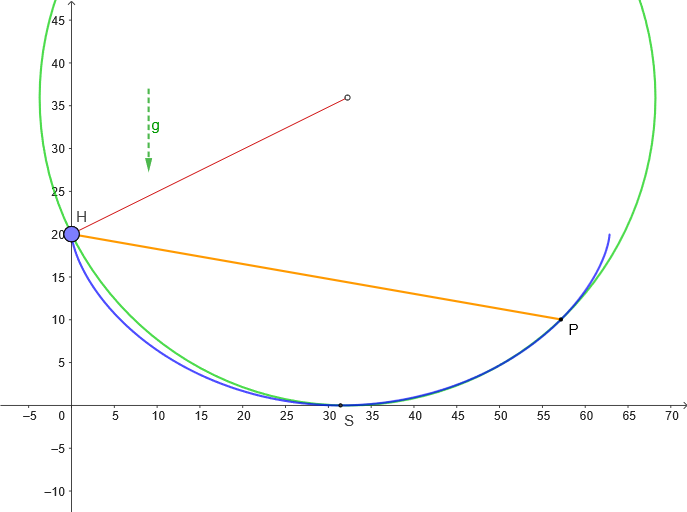
This example demonstrates how parametric equations generate curves and combines geometric construction methods. Key mathematical concepts include parametric equations, geometric construction, and curve properties. Construction involves using GeoGebra commands like CurveCartesian, Point, Tangent, etc. Suitable for high school students or college freshmen learning analytic geometry and parametric equations.
GeoGebra Commands & Parameters
CurveCartesian(((α * r), r) + (r; α + pi / 2), α, 0, (2 * pi)) → cPoint(c) → MTangent(M, c) → iUnitVector(i) → nPoint(c) → PSegment((0, (2 * r)), P) → fPoint(f) → AUnitVector(f) → nACircle(H, S, P) → dPoint(d) → BTangent(B, d) → iB,UnitVector(iB) → nBCenter(d) → DAngle(H, D, S) → ampSegment(D, B) → l
AI Drawing Prompt Reference
Draw a curve generated by parametric equations: for parameter α ranging from 0 to 2π, define the point on the curve from the expression that combines ((α·r), r) with (r, α+π/2). Choose a point M on the curve, construct the tangent line at M, and use the tangent’s direction as a unit direction. Take another point P on the same curve, form a segment from the fixed vertical point (0, 2r) to P, and use the segment’s endpoint as a reference. Build a circle d using a point H and a radius/condition given by S together with P, then pick the tangency point B on that circle, draw the tangent at B, and keep the radius line from the circle’s center D to B. Include the marked angle amp determined by the points H, D, and S, keeping the relationships among the curve, tangents, circle, and angle.
The prompt above was compiled from the original drawing commands and is for reference only.